Migrate accounts from another control panel to CWP
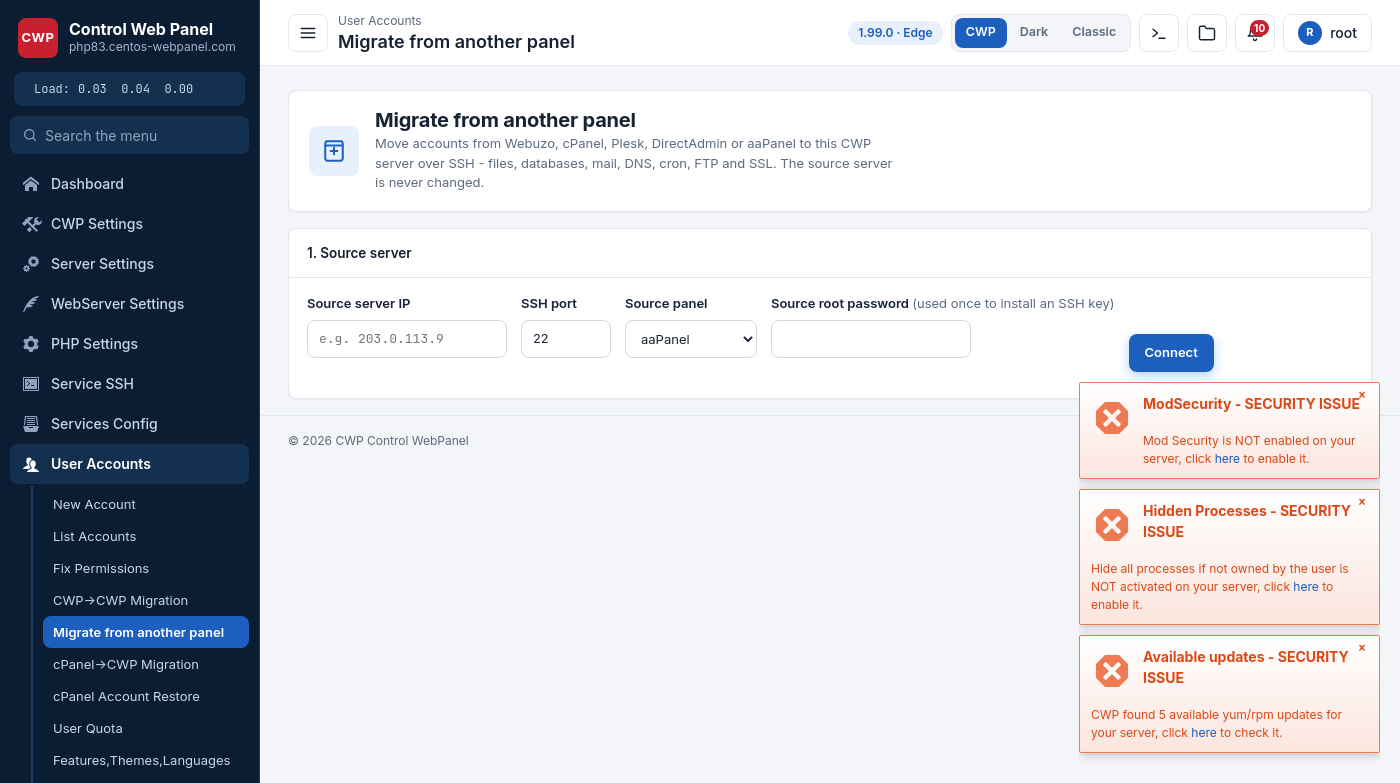
CWP can migrate hosting accounts from Webuzo, cPanel/WHM, Plesk, DirectAdmin, aaPanel, ISPConfig, CyberPanel, Virtualmin and HestiaCP directly over SSH – files, databases (with users and grants), mailboxes (with messages and passwords), mail forwarders, DNS records, cron jobs, FTP accounts and SSL certificates. The source server is never modified.
There are two ways to run it:
- Admin panel module – *Account Functions → Migrate from another panel* (point-and-click).
- Command line –
/scripts/cwp_migrate_external(for large jobs you want to run inscreen/over SSH).
Both drive the same engine, so a job started on the command line can be watched in either place.
Before you start
- A clean (or at least non-conflicting) CWP destination server – the one you are reading this on. Accounts are
created here with CWP’s own tools (system user, vhost, DNS zone, mail domain, php-fpm pool), exactly like a normal new account, so limits come from the chosen package (default if none).
- Root SSH access to the SOURCE server. The module installs the panel’s SSH key on the source the first time you
connect (you enter the source root password once); after that everything is key-based. Nothing is written on the source – it is only read.
- Enough disk space on the destination for the migrated
/homedata. - The client’s DNS is not switched automatically. You migrate first, test, then move DNS when you are ready.
Using the admin module
- Open Account Functions → Migrate from another panel.
- 1. Source server – enter the source server IP, SSH port (22 by default), pick the source panel
(Webuzo / cPanel / Plesk / DirectAdmin) and the source root password, then click Connect. The password is used only once to install the SSH key; if a key already works, you can leave it empty.
- 2. Accounts to migrate – click Discover accounts. CWP lists every account on the source with its primary
domain, number of databases and mailboxes. Tick the accounts you want. – Options: Dry-run (list what would happen, change nothing), Skip DNS, Skip mail.
- Click Migrate selected and confirm.
- 3. Progress – a live log shows each account and step (account → domains → files → databases → mail →
forwarders → dns → cron → ftp → php → ssl) with OK / FAILED. A failed step can be retried; finished steps are skipped on a re-run.
Using the command line
# list the accounts on the source
/scripts/cwp_migrate_external discover <panel> root@<source-ip> [-p <port>]

# migrate some or all accounts (omit --accounts for all)
/scripts/cwp_migrate_external migrate  <panel> root@<source-ip> [-p <port>] \
        [--accounts user1,user2] [--dry-run] [--no-dns] [--no-mail]

# a job is resumable - re-running skips the steps that already finished
/scripts/cwp_migrate_external status
<panel> is one of webuzo, cpanel, plesk, directadmin. The key-based SSH must already be set up (the admin module does this for you; from the shell use ssh-copy-id).
What is migrated
| Item | Notes |
|---|---|
Files (/home/<user>) | rsync with resume for very large accounts; ownership remapped to the new CWP user, docroots made web-readable. |
| Databases | each DB streamed and imported; DB users recreated with their original password hash so apps keep connecting. |
| Mailboxes | messages copied to CWP’s /var/vmail; the password is preserved (dovecot verifies by scheme). |
| Mail forwarders | recreated in CWP’s mail aliases. |
| DNS | only the records you added by hand (custom TXT, custom A/CNAME subdomains) – CWP generates a correct zone (SOA/NS/SPF/DKIM/DMARC) pointing at THIS server, so the old server’s records are not copied. |
| Cron | the account’s crontab. |
| FTP | pure-ftpd virtual users recreated with the original password hash. |
| SSL | the installed certificate is copied so https keeps working; AutoSSL re-issues after the DNS switch. |
| Domains | primary, addon, subdomains and parked/alias domains (added as a CWP alias on the main docroot). |
After the migration
- Per-domain PHP version – the migration records each domain’s source PHP version in the log; set the matching
version in PHP-FPM Selector (the site runs on the server default until then).
- Test each site with its domain (a
Host:header or a local hosts entry) before switching DNS. - Switch DNS to this server’s IP only when you are satisfied; AutoSSL then issues Let’s Encrypt certificates.
Per-panel notes
- Webuzo (Ubuntu/EL) – reads
/var/webuzo/users, the ApachewebuzoVH.conf, BIND zones and the account maildirs. - cPanel/WHM – reads
/var/cpanel/users+/var/cpanel/userdata,/etc/valiases, the per-domainshadowmail
passwords, /etc/proftpd/passwd.vhosts and the AutoSSL apache_tls certificates.
- DirectAdmin – reads
/usr/local/directadmin/data/users,/etc/virtual/<domain>/{passwd,aliases}and the
per-domain certificates.
- Plesk – reads the
psadatabase (plesk db) for subscriptions, domains, databases and mail, and the mailbox
passwords via mail_auth_view.
- ISPConfig – reads the
dbispconfigdatabase (web_domain, web_database/web_database_user, mail_user,
mail_forwarding, ftp_user). Each ISPConfig vhost (its own web<N> system user, files under <document_root>/web) becomes one CWP account with files placed in public_html; database, mail and FTP password hashes are migrated verbatim so credentials keep working.
- CyberPanel – reads the
cyberpaneldatabase (websiteFunctions_websites + childdomains/aliasdomains,
databases_databases, e_users mail) and the pure-ftpd users; each CyberPanel website (its own externalApp system user, files under /home/<domain>/public_html) becomes one CWP account. Database-user hashes come from mysql.user and mail/FTP password hashes are migrated verbatim.
- aaPanel – reads the panel’s SQLite store
/www/server/panel/data/default.db(sites, extra domains, databases,
FTP). The panel keeps that DB locked while it runs, so CWP reads it read-only (immutable) – no need to stop the panel. aaPanel keeps DB/FTP passwords in plaintext; CWP converts them to the proper MySQL/crypt hashes on import, so credentials keep working. Each aaPanel site (one docroot under /www/wwwroot) becomes one CWP account.
- Virtualmin – reads the
virtualmincommand-line interface (list-domains,list-databases,list-users,
list-aliases), so it works regardless of where Virtualmin stores its data. Each top-level virtual server becomes one CWP account (its sub-servers and alias domains are carried as that account’s extra domains); files land in public_html, database-user hashes come from mysql.user, and mailbox hashes + forwarders are migrated verbatim. Note: Virtualmin may store mailbox passwords as yescrypt ($y$); a destination on EL8/EL9 verifies these, while on EL7 the mailbox is created but left inactive until a new password is set.
- HestiaCP (also reads VestaCP-compatible installs) – reads Hestia’s own on-disk store under
/usr/local/hestia/data/users/<user>/ read-only (user.conf, web.conf, db.conf, mail/<domain>.conf), so the panel need not be stopped. Each Hestia user becomes one CWP account (its first web domain is the primary, the rest become addon domains); files go into public_html, database-user hashes come from Hestia’s db.conf (mysql native), and mailbox hashes ({BLF-CRYPT}/{SHA512-CRYPT}) and FTP hashes are migrated verbatim. The per-domain PHP version is taken from the Hestia web template (BACKEND).
PostgreSQL databases are reported but not migrated automatically. Always run a dry-run first on a large server.