Spam Filter (Rspamd)
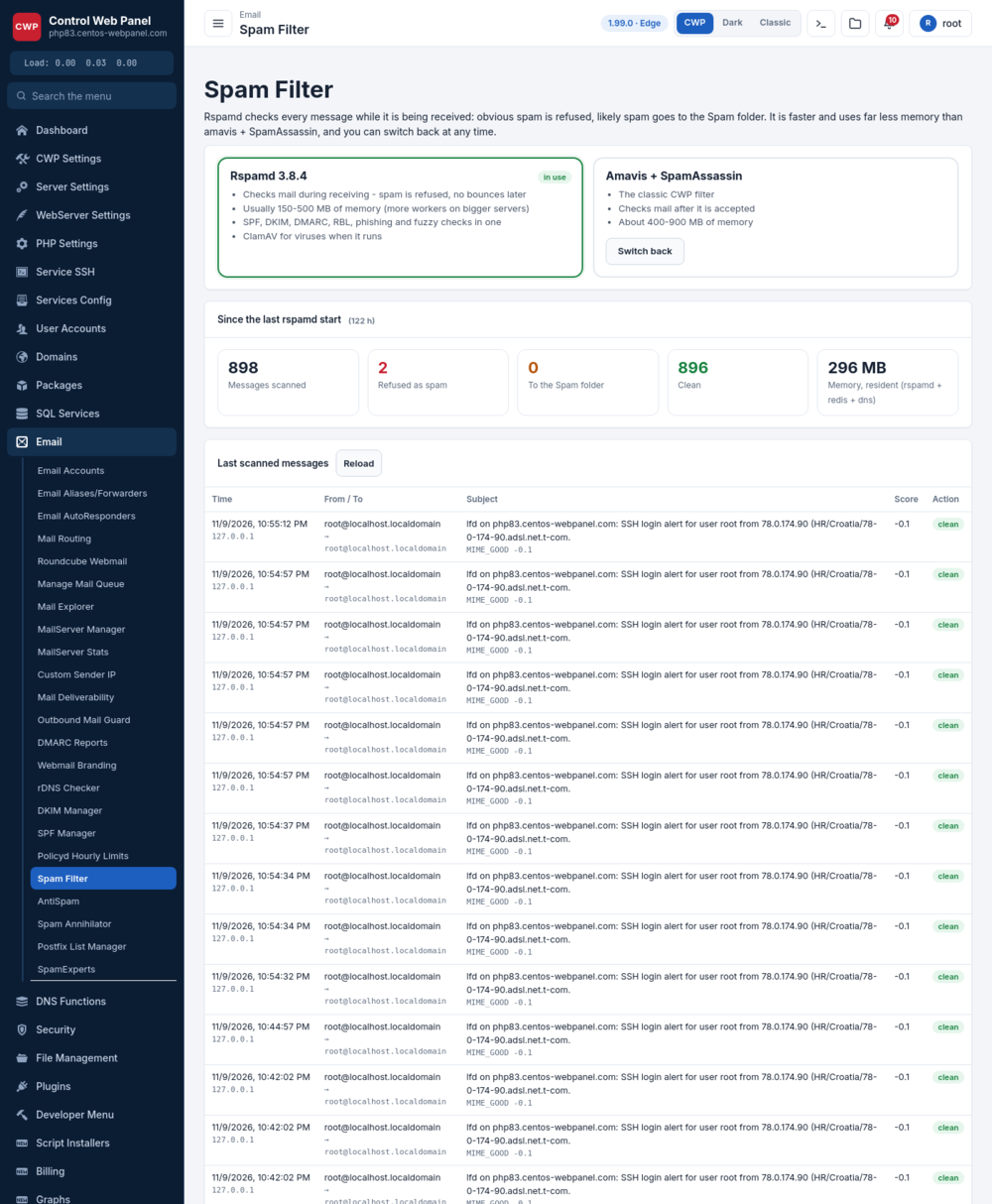
CWP can run Rspamd as the mail server’s spam filter, as a faster, lighter alternative to the classic Amavis + SpamAssassin stack. Rspamd scores every incoming message, rejects the clear spam before it is accepted, and keeps the rest flowing to the mailboxes.
Where to find it
Email → Spam Filter in the admin panel.
Rspamd vs Amavis + SpamAssassin
The page shows the two engines side by side with a single switch:
- Rspamd — multi-threaded, checks messages at SMTP time, and uses far less memory than Amavis. Recommended.
- Amavis + SpamAssassin — the older stack; kept so you can switch back if you need it.
Use the Switch button to move between them. Switching reconfigures Postfix’s mail filter and restarts the affected services; existing mail is not touched.
What the page shows
Once Rspamd is active the page is a live dashboard:
- Counters — messages scanned since Rspamd started, how many were refused as spam, how many were filed to the Spam folder, and the memory Rspamd is using.
- Last scanned messages — a live table of recent mail with the time, sender, recipient, subject, the spam score Rspamd gave it and the action taken (accept / greylist / reject). Use it to confirm legitimate mail is passing and to spot what is being blocked.
- ClamAV virus check — whether the antivirus scan is wired into the mail path.
- Postscreen connection filter status.
Notes
- Rspamd decides at SMTP time, so obvious spam is rejected with a 5xx before it ever reaches a mailbox — the sender gets a bounce and nothing lands in the Spam folder for that message.
- Tuning (score thresholds, allow/deny lists, greylisting) is done in Rspamd’s own configuration under
/etc/rspamd/; the panel page is for switching engines and watching what the filter is doing. - Rspamd is part of the CWP mail stack across EL7/EL8/EL9/EL10.