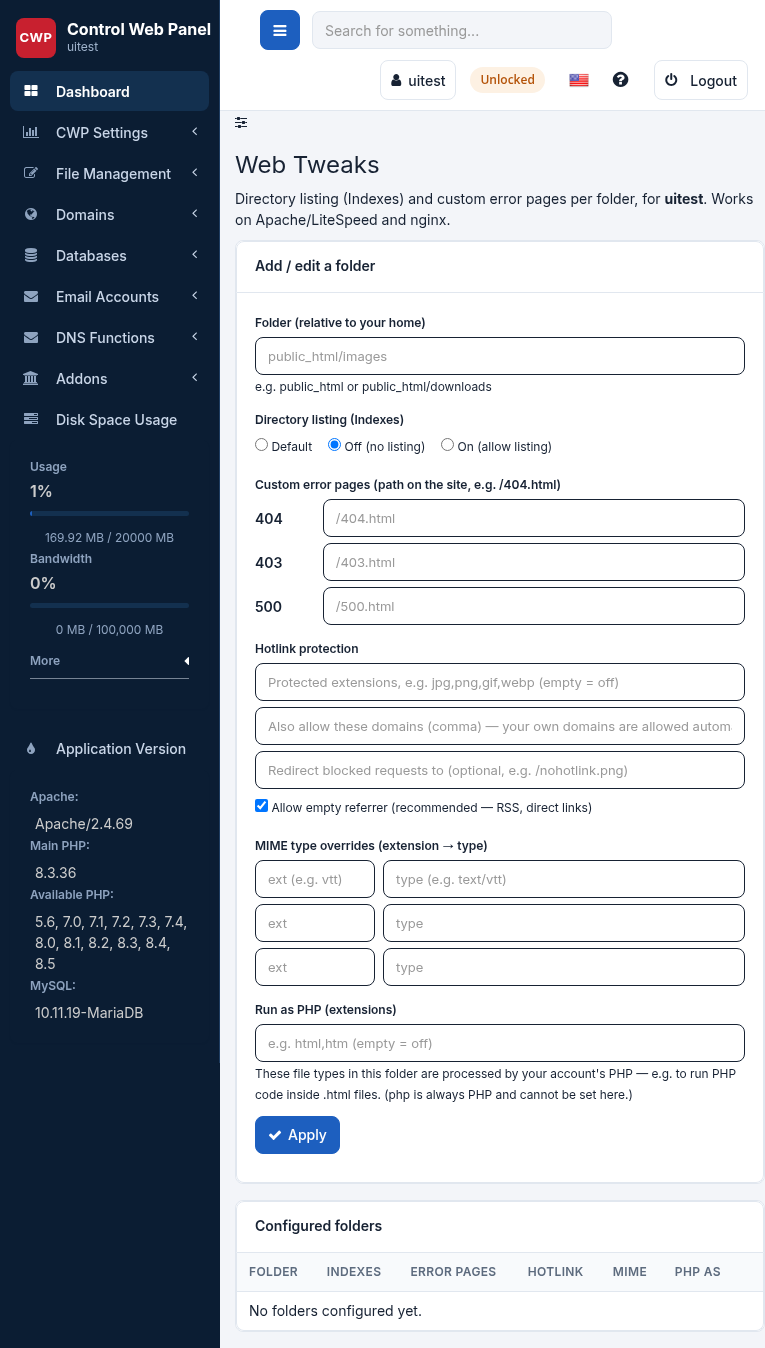
Web Tweaks is a set of small, per-site web-server tweaks that used to need a hand-written .htaccess file. The panel writes them for you, as your own account, and — this is the important part — applies them on both Apache and Nginx, so the same tweak works whichever web server your site runs on.
Where to find it: File Management → Web Tweaks. Each tweak is set per folder: pick the folder inside your website (for example your document root, or a sub-folder like /images), choose the options, and save. You can remove a tweak at any time to return the folder to its default behaviour.
Directory Indexes
When a visitor opens a folder that has no index file (no index.html, index.php and so on), the web server either shows an automatic list of the files in that folder or returns 403 Forbidden. Here you choose which:
- Disable directory listing — hide the file list (recommended for most folders; stops visitors browsing your files).
- Enable directory listing — show the automatic index (useful for a downloads or files folder).
Custom Error Pages
Replace the plain web-server error screens (404 Not Found, 403 Forbidden, 500 and others) with your own page. Enter the error code and the path to the document that should be shown for it, for example 404 → /errors/404.html. The path is relative to the folder you are editing.
Hotlink Protection
Hotlinking is when another website embeds your images (or other files) directly, using your bandwidth to display them on their pages. Hotlink Protection allows requests only when they come from your own site (and any extra domains you list) and blocks the rest.
- Allowed domains — your own domain is always allowed; add any other sites that may link to your files.
- Protected extensions — the file types to protect, such as
jpg,jpeg,png,gif,webp. - Redirect URL (optional) — send blocked requests to a replacement image instead of returning an error.
MIME Types
A MIME type tells the browser what a file is. If the server sends the wrong type — or none — a file may download instead of opening, or a font or script may be ignored. Here you can map a file extension to the correct type, for example .webmanifest → application/manifest+json, so the browser handles it correctly.
PHP Handlers
By default only .php files are run as PHP. A handler lets you run an extra extension as PHP too — most often .html, so that HTML pages can contain PHP code.
php, phtml, phar and other interpreter names are rejected.Related: Leech Protection
Leech Protection is a separate, related feature (its own entry under File Management) that guards a password-protected directory against a shared or leaked password. See Leech Protection for details.