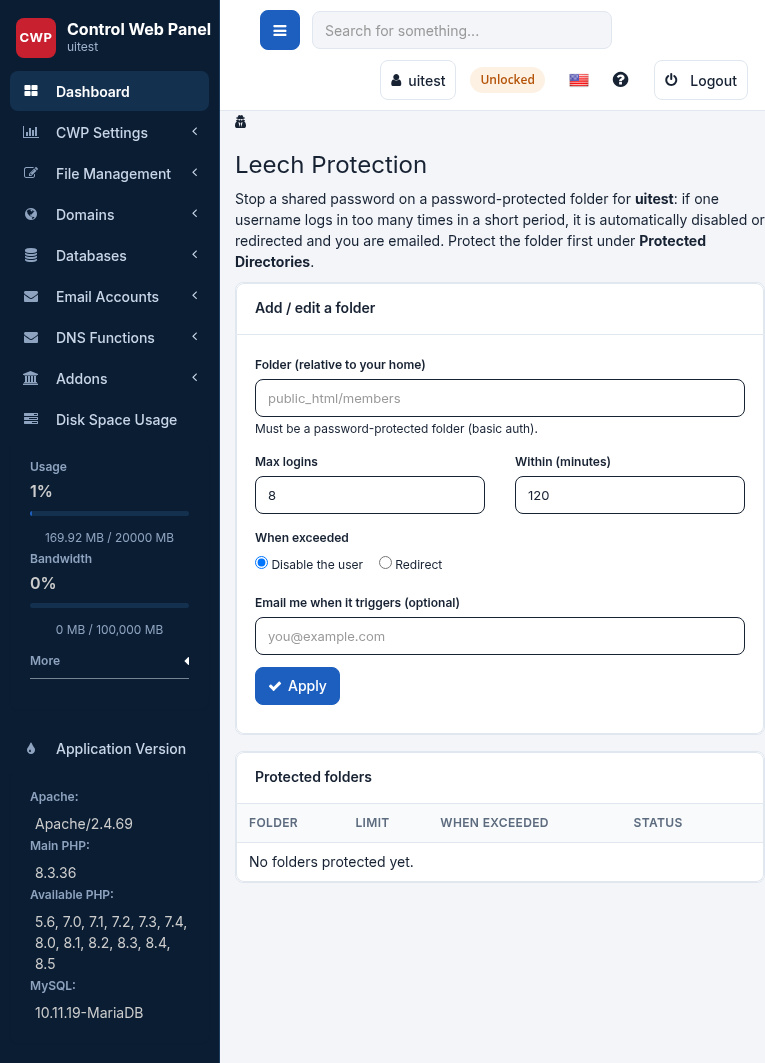
Leech Protection guards a password-protected directory against a shared or leaked password. If several people use the same username and password to get into a protected area, Leech Protection notices the single login being used far more than one real person could, and shuts it down automatically.
Where to find it: File Management → Leech Protection.
How it works
For every username that signs in to the protected folder, the panel counts the sign-ins inside a time window. A normal visitor is counted only once per session — a cookie stops repeat counting — so ordinary browsing is never affected. When a single username goes over the limit you set, that username is acted on immediately: it is either disabled (commented out of the folder’s password file so it can no longer sign in) or the visitor is redirected to a page you choose. Either way the folder owner is e-mailed so you know it happened.
Turn it on for a folder
- Protected folder — pick a folder that already has password protection (for example
public_html/members). - Max logins — how many sign-ins one username may make within the window before action is taken.
- Time window — the period the count is measured over (for example 2 hours).
- Action — Disable the user (block that username) or Redirect to a page such as
/denied.html. - Notify e-mail — where to send the alert when protection triggers.
Save, and the folder is protected from then on. You can change the limits or remove Leech Protection from the same screen at any time; removing it leaves the directory’s normal password protection in place.
Re-enabling a disabled user
If a real user was disabled because their password had been shared too widely, open the folder’s password file (in Directory Protection), give them a fresh password, and they can sign in again — now with a password only they know.