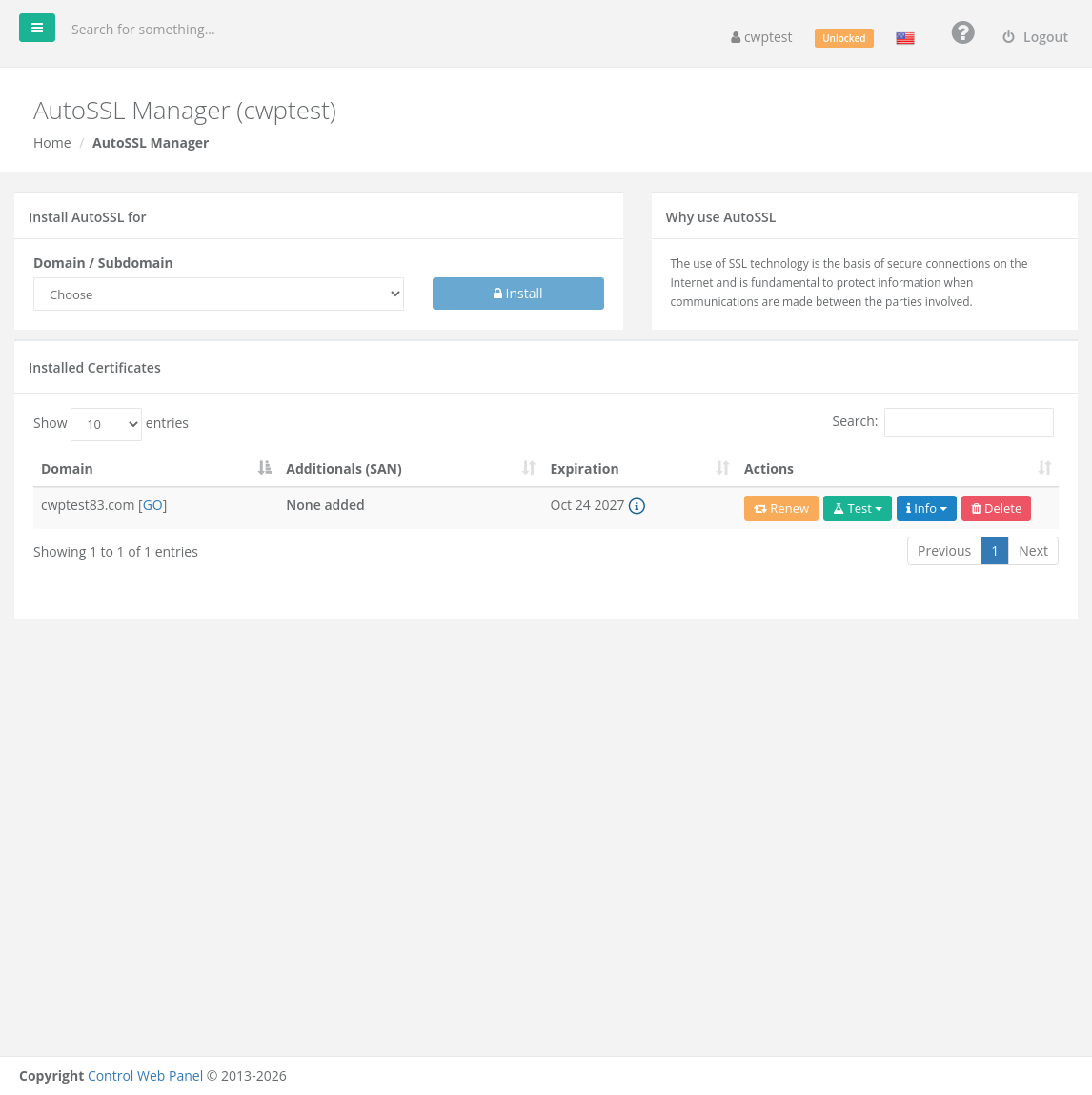
AutoSSL installs free SSL certificates from Let’s Encrypt on your domains and subdomains, so your websites open with https:// and a padlock. Certificates are valid for 90 days and are renewed automatically.
Where to find it: Domains → AutoSSL.
Before you start
The domain must point to this server (its A record must show the server IP) and must belong to your account. Let’s Encrypt checks this by requesting a test file from your website over plain HTTP, so:
- DNS changes must have finished,
- the domain must not redirect to another server,
.htaccessrules must not block access to/.well-known/acme-challenge/.
Install a certificate
- Under Install AutoSSL for, choose the Domain / Subdomain.
- The panel checks the domain. If it is reachable you can tick Add additional (SAN) names, such as
www,mailor other subdomains, to include them in the same certificate. - Click Install and wait a few seconds.
The certificate appears under Installed Certificates.
Installed certificates
| Column / button | Meaning |
|---|---|
| Domain and [GO] | The domain; GO opens it with https:// |
| Additionals (SAN) | Other names included in the certificate |
| Expiration | Expiry date. The ⓘ icon shows the days left. |
| Renew | Renew the certificate now (normally not needed) |
| Test | Check the certificate with external SSL test tools |
| Info | Certificate details (issuer, validity, key) and the CRT, KEY and BUNDLE files, which you can copy |
| Delete | Remove the certificate. Additional subdomain certificates are removed too. |
Make your site use HTTPS
Installing a certificate does not automatically send visitors to https://. To do that:
- In WordPress and most CMSs, change the site address to
https://…in the settings. - Or add an HTTP → HTTPS rule in
.htaccess, or use Redirect.
If the browser shows a padlock with a warning, the page loads images or scripts over http:// (“mixed content”) — change those links to https://.
Common problems
| Message | Solution |
|---|---|
| DNS of your domain doesn’t point to this server or you have htaccess restrictions | Check that the domain’s A record points to the server IP and that .htaccess does not redirect or block /.well-known/. Wait for DNS changes to finish and try again. |
| A certificate for this domain already exists | Use Renew instead, or delete the old certificate first. |
| However the following SAN can’t be added due to redirection problems | The main certificate was installed but some extra names do not point to this server. Fix their DNS and renew. |
| Certificate expired | Automatic renewal failed, usually because the domain no longer points here or a redirect blocks validation. Fix it and click Renew. |
| Too many requests | Let’s Encrypt limits how many certificates can be issued for one domain per week. Wait and try again later. |
For a paid certificate from another authority (for example an EV or wildcard certificate), use Custom SSL.