Servers are the machines where the billing creates your clients’ accounts. A server module talks to the server’s API: it creates, suspends, unsuspends and terminates accounts, changes packages and passwords, and logs the client in to the panel.
Where to find it: Servers in the left menu.
Supported panels
| Module | API used | Actions |
|---|---|---|
| CWP (Control Web Panel) | CWP API, port 2304 | Create, suspend, unsuspend, terminate, change package, change password, log in to CWP, packages kept on the server, the CWP Billing module |
| cPanel / WHM | WHM API token | Create, suspend, unsuspend, terminate, change package, change password, single sign-on |
| DirectAdmin | Login key | Create, suspend, unsuspend, terminate, change package, change password (no single sign-on) |
| Plesk | Secret key (plesk bin secret_key -c) or admin:password | Create (customer and subscription), suspend, unsuspend, terminate, change service plan, change password |
| Proxmox VE | API token | Create, suspend, unsuspend, terminate, change plan and password of a VM or container |
| Virtualizor | Admin API key and pass, entered as KEY:PASS | Create a VPS from a plan and OS template (or the OS the client chose, see configurable options), suspend, unsuspend, terminate, change plan, change root password |
| SolusVM 1 | API ID and key, entered as ID:KEY | Create a VPS (and the SolusVM client), suspend, unsuspend, terminate, change plan, change root password |
| Webuzo | Admin API on port 2005: root:PASSWORD, or an API key (Settings → API Keys) entered as apikey:USER:KEY | Create, suspend, unsuspend, terminate, change plan, change password, single sign-on to the Webuzo user panel |
| AzuraCast (web radio) | API key of a super administrator (My Account → API Keys), port 443 | Create a station with its limits (listeners, bitrate, mount points, HLS streams, media quota, AutoDJ, DJs), a role and a login for the client; suspend (station disabled, permissions removed), unsuspend, terminate, change limits, change password, single sign-on (AzuraCast 0.20+). Stations made by the WHMCS AzuraCast module are taken over |
| Pterodactyl (game servers) | Application API key (Admin → Application API) with Read & Write on Users, Servers, Nodes, Allocations, Locations and Nests; the panel must use HTTPS | Create a server from an egg on a location (the panel picks the node and a free port), with memory, swap, disk, CPU, IO, databases, extra ports and backups; the client’s panel user is reused by e-mail or created. Suspend, unsuspend, terminate, change limits, change password. No single sign-on (Pterodactyl has none) |
| CWPpro licence (CWP partner) | Reseller Manager API key and secret, entered as API_KEY:API_SECRET; hostname reseller-manager.control-webpanel.com | Sell CWPpro licences from your CWP partner account: create registers the client’s server IP, suspend and terminate remove it, unsuspend adds it again, Apply product package moves the licence after the client’s IP field was changed. Each IP counts against your partner licence limit. |
AzuraCast products
The station name, URL, genre and description come from the product’s custom fields named Station Name, Station URL, Station Genre and Station Description (add them to the product and show them on the order form). The limits are product settings; a configurable option with the same code (max_listeners, max_bitrate, max_mounts, max_hls_streams, storage_quota, autodj, streamers, public_page) lets the client choose instead, for example more listeners for a higher price.
The client logs in to AzuraCast with the e-mail shown as the service’s username and the service password, or with Log in to the control panel on the service page. AzuraCast cannot suspend a station by itself, so a suspension switches the station off and removes the client’s permissions; unsuspending gives both back and restarts the station.
Pterodactyl products
Pick the Egg (the list comes from the panel) and enter the Location id. Limits are product settings; a configurable option with the same code (memory, swap, disk, cpu, io, databases, allocations, backups) lets the client choose. Egg variables use the egg’s defaults; set others in Egg variables as KEY=value;KEY2=value, or let the client choose with an option whose code is env_ plus the variable name (for example env_SERVER_JARFILE). The server’s address (ip:port) is shown as the service’s IP.
CWPpro licence products (CWP partners)
Requires an active CWPpro – Partner licence from CWP. The full guide is Reselling CWPpro licences.
Add a server with Panel type CWPpro licence (CWP partner), hostname reseller-manager.control-webpanel.com, port 443 and your Reseller Manager key as API_KEY:API_SECRET. On the product choose this module and add a required custom field “Server IP” shown on the order form: the client enters the IP of the server that gets the licence. To move a licence to another IP, change the service’s Server IP field and click Apply product package.
Add a server
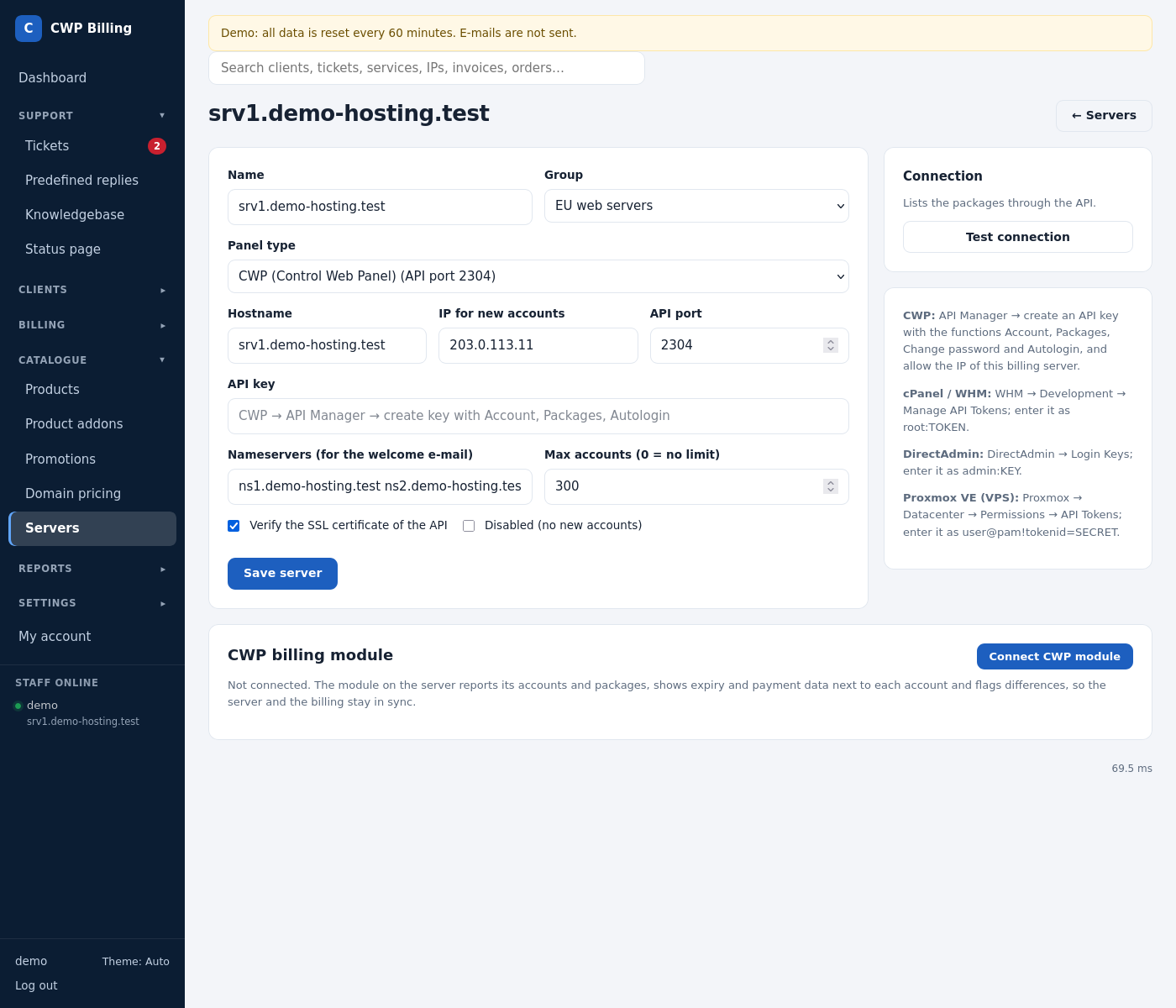
- Open Servers → Add server.
- Fill in the form:
| Field | Meaning |
|---|---|
| Name | Your name for the server, for example srv1. |
| Group | Server group. Products are linked to a group, and new accounts go to the server in the group with the fewest accounts. |
| Panel type | CWP, cPanel, DirectAdmin, Plesk, Proxmox, Virtualizor, SolusVM, Webuzo, AzuraCast, Pterodactyl or CWPpro licence (CWP partner). |
| Hostname | The server’s host name. The billing calls the API at this name. |
| IP for new accounts | The shared IP that new accounts get. |
| API port | CWP: 2304. |
| API key | CWP: the key from CWP Settings → API Manager. cPanel: a WHM API token. The key is stored encrypted. |
| Nameservers | Shown in the welcome e-mail. |
| Max accounts | 0 = no limit. A full server is skipped when the billing chooses one for new accounts. |
- Click Save server, then Test connection.
From the command line:
php bin/console server:add --name=srv1 --hostname=srv1.example.com --ip=203.0.113.10 --group=Hosting --port=2304
php bin/console server:list
Module actions on a service
Open a service. The Server box on the right has these buttons:
- Create account
- Suspend
- Unsuspend
- Apply product package
- New random password
- Terminate, which deletes the account and all its data on the server
Every call and its answer are logged under Server actions on the service and Recent API calls on the server. Staff need the permission Run server actions.
Billing on the same server as the panel
A panel restarts PHP-FPM or the web server while it creates or removes an account (CWP adds a PHP-FPM pool for every new account). When the billing runs on that same server, the restart would cut off the billing’s own request (a “503 Service Unavailable” page). The billing detects a panel on its own machine and does Create account, Suspend, Unsuspend, Change package and Terminate from the cron job instead: the button answers “Queued”, the module log shows “queued for cron”, and the result appears there within a few minutes (at the next cron run). For a panel on another machine that still restarts the billing’s web server, tick Run account actions from cron on the server.
Clients have Log in to the control panel on their service page (CWP and cPanel), so they don’t need a separate panel password.
Common problems
| Problem | Cause and solution |
|---|---|
| Test connection fails with a timeout | The billing server cannot reach the API port. Open port 2304 (CWP) in the firewall of the hosting server, only for the billing server’s IP. |
| Access denied / invalid key | CWP: the API key needs the billing server’s IP in the API Manager, and permissions for account, packages, changepack, changepass and user_session. |
| SSL error | The server’s certificate does not match its host name. Fix the certificate, or untick Verify the SSL certificate of the API for this server. |
| “503 Service Unavailable” after Create, Suspend or Unsuspend | The panel restarted the web server or PHP-FPM the billing runs on. Update the billing (it then runs these from cron), or tick Run account actions from cron on the server. Check on the panel whether the account was created before you run Create again. |
| Username already exists | The billing generates the user name from the domain. If it exists on the server, change the user name on the service and run Create again. |