Once a day the billing runs its automation: it creates renewal invoices, charges saved cards, sends reminders, adds late fees, and suspends and terminates overdue services. It runs from the cron (bin/console cron) at the hour you choose.
Where to find it: Billing settings → Automation.
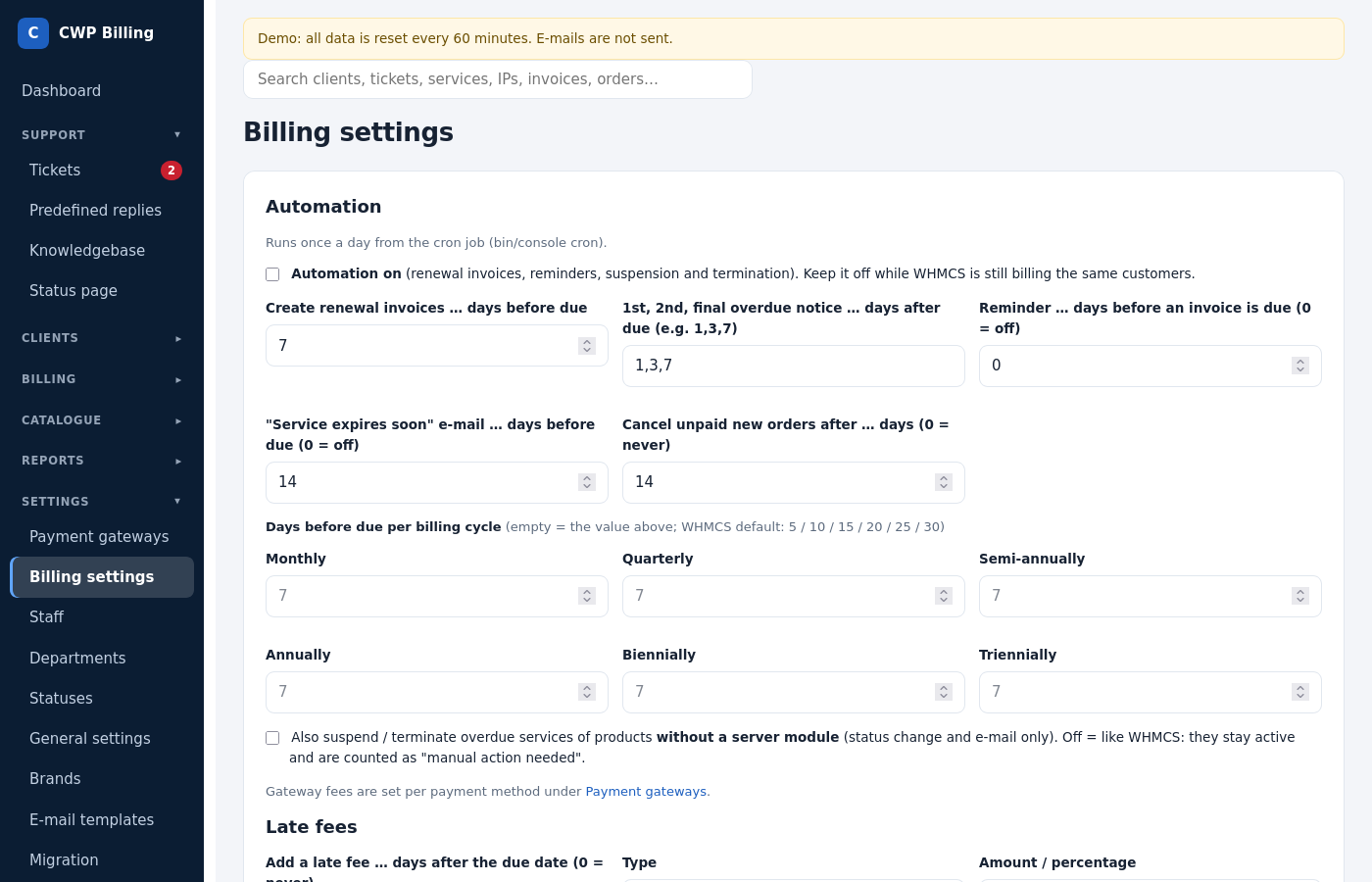
What the daily run does, in this order
- Renewal invoices. It creates them for services and domains whose due date is within Create renewal invoices … days before due. Several services of one client that are due on the same day go on one invoice. The client’s account credit is applied automatically.
- Automatic card charge. Invoices of clients with a saved Stripe card are charged on the due date. A failed charge is retried on the days set under Card payment retries (default 1, 3, 5 and 7 days after the due date).
- Overdue notices. The 1st, 2nd and final notice are sent the given number of days after the due date, for example
1,3,7. - Reminders before the due date and the “Service expires soon” e-mail. Both are optional.
- Late fees (optional). A percentage or a fixed amount, added the given number of days after the due date, with an optional minimum.
- Suspension and termination. Suspension happens Suspend on the server … days after due. Termination Terminate (delete account) … days after due deletes the account on the server. 0 means never. Paying the invoice unsuspends the service automatically. For services without a server module, see below.
- Unpaid invoices are cancelled Cancel unpaid invoices … days after due (optional; partly paid ones stay).
- Stale orders. New orders that are still unpaid after the given number of days are cancelled.
- Quotes that were sent and are past their Valid until date become Expired.
The result of every run is in the audit log, and the time of the last run is on the dashboard.
Settings
| Setting | Default | Meaning |
|---|---|---|
| Automation enabled | on | Off: the daily run does nothing. Use this during testing or a WHMCS migration. |
| Hour of the daily run | 0 | The server hour (in the time zone from the installation). |
| Create renewal invoices … days before due | 7 | It can be different per billing cycle (monthly, annually, …). |
| Overdue notices | 1,3,7 | Days after the due date. |
| Reminder … days before an invoice is due | 0 | 0 = off. |
| “Service expires soon” e-mail | 14 | Days before the due date. 0 = off. |
| Suspend … days after due | 3 | 0 = never. |
| Terminate … days after due | 30 | 0 = never. |
| Cancel unpaid invoices … days after due | 0 | 0 = never. Partly paid invoices stay. |
| Cancel unpaid new orders after … days | 14 | 0 = never. |
| Late fee | off | Days, type (percent or fixed), amount, minimum. Clients in a group with no late fees never get one. |
| Card payment retries | 1,3,5,7 | Days after the due date. See Card payment retries. |
Exceptions per service
On a service, No auto-suspend until keeps the service running until that date, for example for a client who promised to pay.
Services without a server module
Services of products without a module (licenses, support, manual services) have no account on a server. By default they stay active when overdue and are counted as manual action needed, like in WHMCS. Two settings in Billing settings → Automation change this:
- Also suspend / terminate overdue services of products without a server module: the status changes and the client gets the e-mail, on the same days as other services.
- Terminate services without a server module after the terminate days in any case: also services that expired without an open invoice. Their unpaid invoices and the gateway subscription are cancelled. Services with a payment in the last 45 days are left to staff.
Paid but not active
When a service is still Pending 24 hours after its invoice was paid (the client paid and has nothing: manual activation forgotten, a module error, a missing IP or domain), the billing opens an alert ticket in the Alerts department and sends a Telegram message, once per service. The dashboard shows a Paid, not active tile that opens the list (Services → filter paid_pending). Change the hours under Settings → General → Delivery watch (Alert when a paid service is still Pending after), or 0 to switch it off. Only invoices paid in the last 60 days count.
Preview
See what the next run would do without changing anything:
php bin/console billing:previewCommon problems
| Problem | Cause and solution |
|---|---|
| No renewal invoices are created | The cron is not running, or Automation enabled is off. Check the last run time on the dashboard and run php bin/console cron by hand to see errors. |
| The daily run happened at the wrong hour | The time zone in config/config.php (timezone) differs from what you expect. The hour uses that time zone. |
| A service was not suspended | It has No auto-suspend until set, its product has no module, or the server module returned an error (see the service’s Recent API calls). |
| A client got two invoices for one service | An invoice was created by hand for the same period. Cancel one of them. The automation does not create a second renewal invoice while one is open. |