Clients pay invoices with Stripe (cards and the wallets you enable in Stripe Checkout), PayPal, Skrill, Mollie, Authorize.net, BTCPay Server (crypto), Mercado Pago, Pix, Razorpay or bank transfer. Card data never touches your server. Stripe and PayPal show their own payment page.
Where to find it: Payment gateways in the left menu. Gateway log shows every callback and webhook.
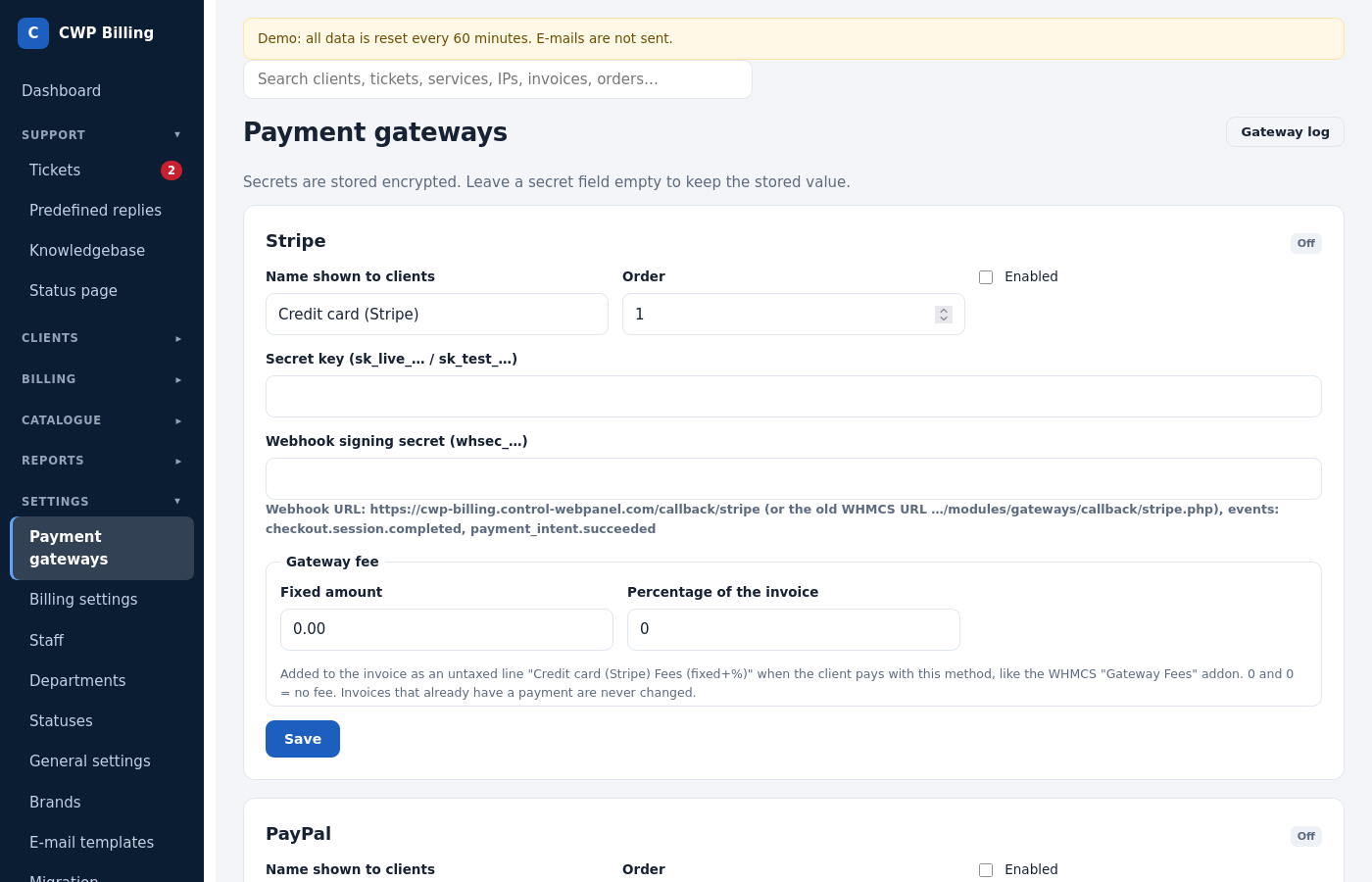
For each gateway you set:
- whether it is active;
- the Name shown to clients;
- its Order in the list;
- the keys;
- an optional gateway fee (a fixed amount or a percentage of the invoice) that is added to invoices paid with it. The order form and the invoice show the fee under the name of each payment method, so the client sees it before choosing. Invoices of services paid by a subscription get no fee, because the subscription always pays the same amount. Credit never pays a fee (see Account credit).
The secrets are stored encrypted.
Stripe
| Field | Where to get it |
|---|---|
| Secret key | Stripe Dashboard → Developers → API keys (sk_live_…, or sk_test_… for testing) |
| Webhook signing secret | Stripe Dashboard → Developers → Webhooks → Add endpoint |
Webhook endpoint: https://billing.example.com/callback/stripe
Events: checkout.session.completed, payment_intent.succeeded
Clients can save their card while paying. Saved cards are charged automatically on the due date of renewal invoices and retried on the days of Card payment retries. A failed charge sends the payment failed e-mail after the first and the last attempt. Clients can remove the card in the client area.
PayPal
| Field | Where to get it |
|---|---|
| REST app client ID and secret | developer.paypal.com → Apps & Credentials → your app (Live) |
| Webhook ID | The same app → Webhooks → Add webhook. URL: https://billing.example.com/callback/paypal, events Payment capture completed and Payment capture refunded (for subscriptions also Payment sale completed / refunded / reversed). Copy the Webhook ID PayPal shows. Moved from WHMCS? The old URL …/modules/gateways/callback/paypalwebhooks.php keeps working. |
| Sandbox | Tick it for testing with sandbox credentials. |
| IPN receiver e-mail(s) | Your PayPal account e-mail(s). IPN payments to any other account are rejected. |
| Classic API username, password and signature (optional) | Only needed to cancel old PayPal Standard subscriptions from the billing: PayPal → Account settings → API access → NVP/SOAP API credentials. |
Old PayPal Standard subscriptions (for example from WHMCS) keep paying: the billing answers their IPN messages at the old WHMCS URL. See Moving from WHMCS.
CWP Billing uses PayPal’s current REST APIs: Orders v2 for checkout and refunds, and signed webhooks. The classic NVP/IPN API is only used for old PayPal Standard subscriptions taken over from WHMCS.
Testing PayPal: create a sandbox REST app and a sandbox buyer account at developer.paypal.com, add the webhook to the sandbox app, enter the sandbox client ID, secret and Webhook ID and tick Sandbox. Make an invoice for a test client, open it from the client area and pay with the sandbox buyer. The invoice turns Paid and the Gateway log shows the webhook as paid invoice …. Then switch back to the live credentials and Webhook ID. The webhook simulator of the PayPal dashboard sends unsigned test events: they show up in the Gateway log as rejected: signature, which proves the URL is reachable but does not test a payment.
Skrill
| Field | Meaning |
|---|---|
| Merchant e-mail | Your Skrill account (pay_to_email) |
| Merchant ID | From the Skrill account |
| Secret word | Skrill → Settings → Developer settings |
Mollie
| Field | Where to get it |
|---|---|
| API key | Mollie Dashboard → Developers → API keys (live_…, or test_… for testing) |
The client pays on Mollie’s page with the methods active in your Mollie account (cards, iDEAL, Bancontact, SEPA, Klarna …). The webhook URL (https://billing.example.com/callback/mollie) is sent with every payment, so there is nothing to set up at Mollie. The billing reads every payment back from the Mollie API with your key before it records it. Refunds work from the invoice.
Authorize.net
| Field | Where to get it |
|---|---|
| API login ID, Transaction key, Signature key | Account → Settings → API Credentials & Keys |
| Account currency | The one currency your merchant account settles in, for example USD |
Webhook: Account → Webhooks → Add endpoint https://billing.example.com/callback/authorizenet, event net.authorize.payment.authcapture.created. The card form is Authorize.net’s hosted page (Accept Hosted). The webhook is checked with the signature key and the transaction is read back from the API. Invoices in another currency than the account currency cannot be paid with it. Refunds work from the invoice (Authorize.net allows them after the transaction has settled).
BTCPay Server
| Field | Where to get it |
|---|---|
| BTCPay Server URL | Your BTCPay Server, for example https://pay.example.com (HTTPS) |
| Store ID | Store → Settings → General |
| API key | Account → API keys, with the permissions Create invoice and View invoices |
| Webhook secret | Store → Settings → Webhooks → Create webhook |
Webhook URL: https://billing.example.com/callback/btcpay, event An invoice has been settled. The client pays in Bitcoin, Lightning or the coins enabled in the store, without a middleman. The billing records the payment when BTCPay reports the invoice as settled (checked with the webhook secret and read back from the API). Refunds are made in BTCPay and recorded on the invoice.
Mercado Pago
| Field | Where to get it |
|---|---|
| Access token | Mercado Pago → Your integrations → your application → Production credentials (APP_USR-…; test credentials for testing) |
| Card statement text | Optional, up to 13 characters |
| Payment types not offered | Optional, for example ticket to hide boleto or bank_transfer to hide Pix |
The client pays on Mercado Pago’s page (Checkout Pro) with a card, boleto, Pix or Mercado Pago balance, whatever your account offers. The notification URL (https://billing.example.com/callback/mercadopago) is sent with every payment, so there is nothing to set up at Mercado Pago. Card and Pix payments are recorded as soon as the client returns. A boleto is recorded when Mercado Pago reports it paid, which can take a few days. The billing always reads the payment back from the Mercado Pago API with your token before it records it, and records the Mercado Pago fee. Refunds work from the invoice. The invoice currency must be your account’s currency (BRL in Brazil).
Razorpay (India)
| Field | Where to get it |
|---|---|
| Key ID and Key secret | Razorpay Dashboard → Account & Settings → API Keys (rzp_live_…; rzp_test_… for test payments) |
| Webhook secret | Razorpay Dashboard → Account & Settings → Webhooks → Add new webhook: URL https://billing.example.com/callback/razorpay, active event payment_link.paid, and a secret of your choice, entered here as well |
The client pays on Razorpay’s page with UPI, a card, netbanking or a wallet, whatever your account offers, and comes back to the invoice. The payment is recorded right away. The webhook covers clients who close the page before they return. The billing checks Razorpay’s signature and always reads the payment back from the Razorpay API before it records it, together with the Razorpay fee. Refunds work from the invoice. The invoice currency should be one your Razorpay account accepts (INR for Indian accounts). Test with test keys first: test payments never move money.
Pix (static, any bank)
Pix to your own Pix key, without a bank API or contract.
| Field | What to enter |
|---|---|
| Pix key | CPF, CNPJ, e-mail, phone (+55…) or random key |
| Receiver name | As registered at your bank (up to 25 characters; accents are removed in the code) |
| City | Your city (up to 15 characters), required in the Pix code |
| Instructions | Optional text under the QR code |
The invoice shows a Pix QR code and the Pix Copia e Cola code with the exact amount and the invoice number as identifier (txid), so you can match the payment in your bank statement. Only invoices in BRL can use Pix. There is no automatic confirmation: when the money arrives, open the invoice and click Add payment (amount and method are filled in). The client can send the receipt through the link under the QR code, which opens a ticket.
Bank transfer
Enter the payment instructions (bank, IBAN, SWIFT). The billing adds the invoice number as the payment reference. Staff record the payment with Add payment on the invoice.
Reconciliation
Reports → Gateway reconciliation lists:
- callbacks that were rejected or failed, which may be payments you missed;
- invoices paid more than once, for example by a subscription after the invoice was already paid;
- on request, Stripe Checkout payments of the last hours that have no transaction in the billing.
Common problems
| Problem | Cause and solution |
|---|---|
| Stripe: Invalid signature in the gateway log | The webhook signing secret belongs to another endpoint, or to test mode. Copy the secret of exactly this endpoint. |
| PayPal payment done, invoice unpaid | The webhook ID is missing or wrong, or the webhook was created in the sandbox app. Check the Gateway log. |
| The client paid twice | The billing records each gateway transaction ID only once, and Gateway reconciliation lists invoices paid more than once. Refund the extra payment with a credit note, or leave it as account credit. |
| Webhooks are not received at all | The billing URL must be reachable over HTTPS from the internet. Check that a firewall or admin IP allowlist does not block /callback/…. |