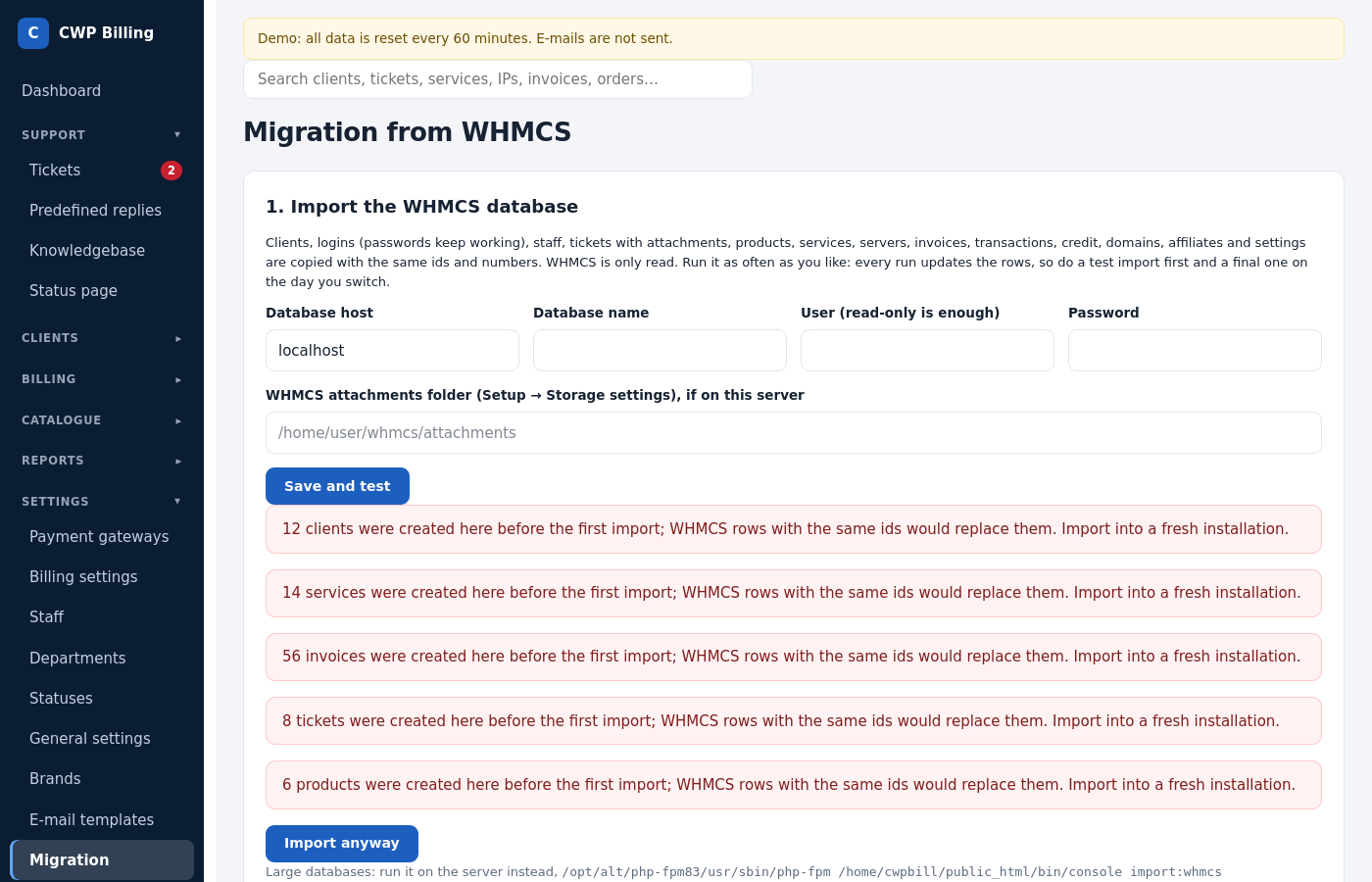
CWP Billing imports a WHMCS 7.x or 8.x database. Clients keep their passwords, and IDs, invoice numbers and ticket numbers stay the same. WHMCS is only read, never changed. You can import as often as you like: do a test import, check everything, then do the final import on the day you switch.
Where to find it: Migration in the left menu.
What is imported
Imported:
- clients with contacts and notes, and their logins (passwords keep working);
- staff (passwords keep working; 2FA is set up again);
- ticket departments, statuses, and tickets with replies, notes, attachments, ratings and log;
- predefined replies, currencies, product groups, and products with prices, custom fields and configurable options;
- servers and server groups, and services with server, subscription and field values;
- orders, invoices with items, transactions, credit and cancellation requests;
- domains with TLD prices, and affiliates;
- general settings: company, automation days, affiliate program, invoice numbering.
IDs and numbers stay the same. Rows created later in the billing start at ID 1,000,000.
Not imported:
- E-mail templates. The billing has its own, in 9 languages.
- Saved cards. Clients pay the next invoice by card once and can save the card again. PayPal and Skrill subscriptions keep running, see step 3.
- WHMCS addons and modules of other vendors.
Step 1: database import
- On a fresh installation, open Migration. Untick Automation enabled in Billing settings until you switch.
- Enter the WHMCS database: host, name, user (a read-only user is enough). If WHMCS runs on the same server, also enter the WHMCS attachments folder.
- Save and test shows the WHMCS version and the table sizes.
- Start import: the next cron run imports everything, and the page shows the progress.
On the command line (large databases, or no cron yet):
php bin/console import:whmcs
php bin/console import:whmcs --only=clients,users,services
Step 2: passwords and API keys
WHMCS encrypts these with its own key:
- hosting and server passwords;
- password custom fields (for example root passwords);
- payment gateway and registrar settings.
Enter cc_encryption_hash from the WHMCS configuration.php in the whmcs section of config/config.php. The import then decrypts them. Alternatively, export them with WHMCS itself:
cd /path/to/whmcs
php /path/to/billing/tools/whmcs-export.php | php /path/to/billing/bin/console import:whmcs-secrets
If WHMCS is on another server, copy tools/whmcs-export.php into the WHMCS folder there and pipe it over SSH:
ssh root@whmcs-server 'cd /path/to/whmcs && php whmcs-export.php' | php bin/console import:whmcs-secretsUse the PHP that runs WHMCS, because it needs the ionCube loader. Nothing is written to disk.
Then check Payment gateways and Domains → Registrars. They are imported disabled, so enable them. Servers without a usable API key are listed. For cPanel, create a WHM API token.
Step 3: switch
- Put WHMCS into maintenance mode, then run the import (step 1) and step 2 one last time.
- Point the billing domain, or the old WHMCS domain, to the new installation.
- If the old WHMCS host name is not this installation’s domain, add it to
legacy_hostsin config.php. Old links to invoices and tickets are then redirected, and payment notifications to the old WHMCS callback URLs keep working. - If the old host must stay on the old server, use the bridge from Migration.
- If the old WHMCS host name is not this installation’s domain, add it to
- Change the webhook URLs in Stripe and PayPal. They are shown under Migration.
- Switch e-mail piping to
pipe.phpand disable the WHMCS cron. - Run
php bin/console billing:preview, check the result, then tick Automation enabled. - In the first days, check Subscriptions and Reports → Gateway reconciliation.
Old PayPal Standard and Skrill subscriptions keep paying. Their notifications go to the old WHMCS URLs (/modules/gateways/callback/…), which the billing answers.
Common problems
| Problem | Cause and solution |
|---|---|
| Access denied when testing the WHMCS database | The database user may connect only from localhost, or lacks SELECT. Grant SELECT for the billing server’s host. |
| Server or gateway passwords are empty after the import | Step 2 is missing: set cc_encryption_hash, or run whmcs-export.php. |
| Attachments are missing | Enter the WHMCS attachments folder and run php bin/console import:whmcs --only=attachments. |
| Many renewal invoices after the switch | Some WHMCS services had pending cancellations or old due dates. Check billing:preview before you switch the automation on. |