The support desk handles tickets from the client area, from e-mail, and from visitors without an account. Staff see the tickets of their departments, answer with predefined replies, write notes that only staff can see, and see live who else is working on a ticket.
Where to find it: Tickets in the left menu. Departments, Statuses and Predefined replies are under the settings.
Departments
| Field | Meaning |
|---|---|
| Name, description | The description is shown to clients when they open a ticket. |
| Replies are sent from this address, and e-mails to it become tickets (piping). | |
| Hidden from clients | For staff only, for example Alerts for the security monitor. |
| Only logged-in clients | Guests cannot open tickets in this department. |
| Colour, order |
Staff see only the departments of their role, unless they have See tickets of all departments.
Working on a ticket
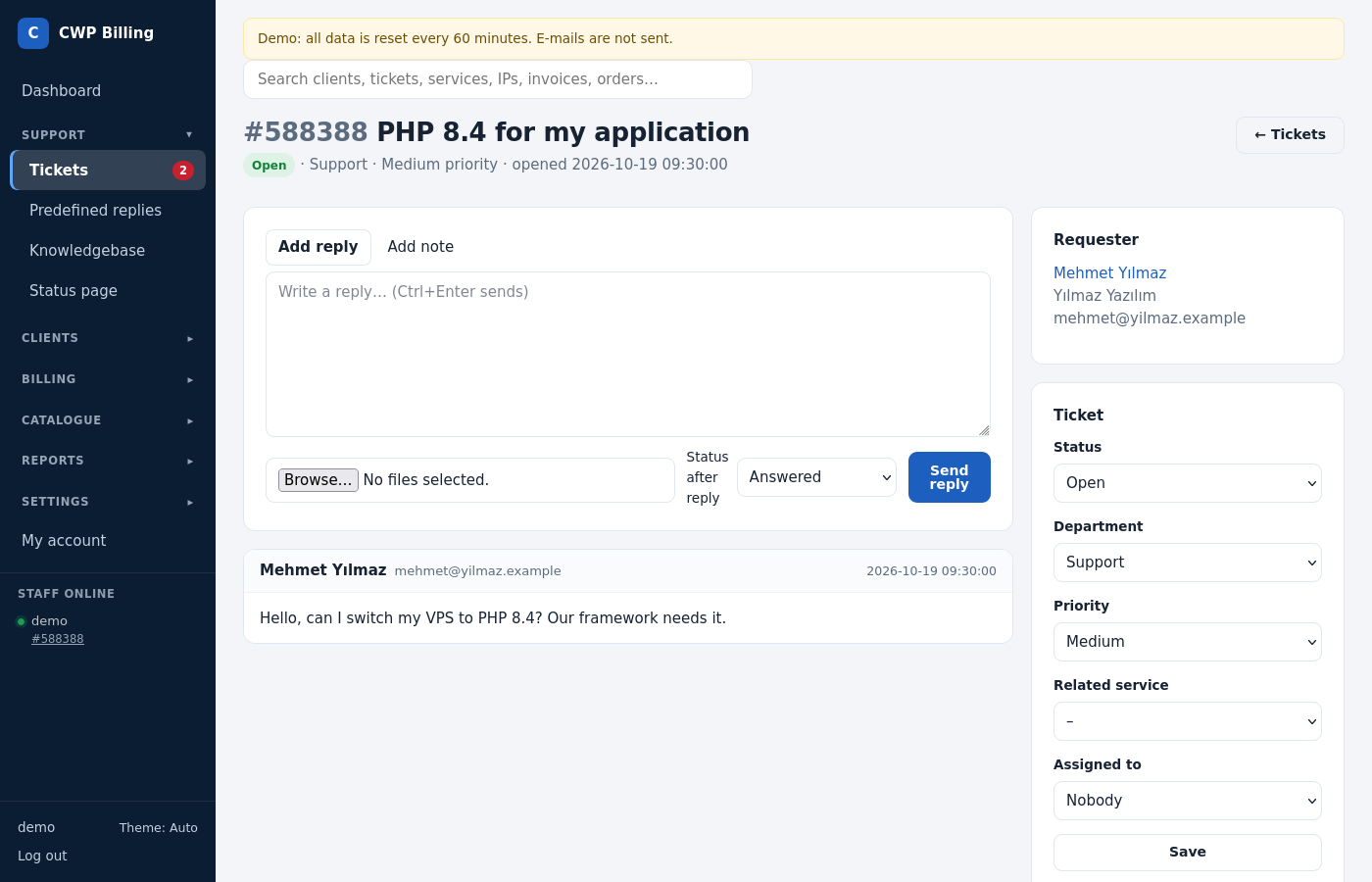
The ticket page shows the conversation with the client’s services, other tickets and notes next to it.
| Part | What you can do |
|---|---|
| Send reply | Answer the client. Insert a predefined reply and attach files. Status after reply defaults to Answered. |
| Add note | A note that only staff see. It is never sent to the client and never shown in the client area. |
| Ticket box | Department, status, priority, Assigned to, related service |
| Requester | The client or guest, with their contacts |
| Client’s services, Other tickets of this client | Context for the answer |
| Server credentials | Passwords that the client sent through the vault |
| Merge / split | Merge into another ticket number, or move selected messages into a new ticket |
| Log | Every change, with time and staff member |
Live: the ticket list and the open ticket update by themselves. You see who else has the ticket open and whether they are typing a reply, so two staff members don’t answer at once.
Clients choose the order of replies (newest or oldest first) on the ticket page. They can jump straight to the latest reply, and they can rate the support.
Statuses, priorities and SLA
- Statuses: Open, Answered, Customer-Reply, On Hold, In Progress, Closed, plus your own. Each has a colour and can count as awaiting a staff reply (shown in the queue) or as closed for auto-close.
- Priorities: Low, Medium, High.
- SLA (General settings → Tickets): the hours to the first reply per priority. Tickets over the SLA show an SLA +hours badge in the list.
- Auto-close: close tickets that wait for the client this many hours after the last staff reply.
- Attachments: the allowed file types and the maximum size.
E-mail piping
E-mails to a department address become tickets, and replies to ticket e-mails become ticket replies. Forward each address to pipe.php:
# /etc/aliases (Postfix), or a forwarder "pipe to a program" in your mail server
support: "|php -q /home/user/billing/pipe.php"
[Ticket ID: 123456]in the subject makes the e-mail a reply to that ticket, if the sender is its client, a user of the client, the guest who opened it, or a staff member.- Otherwise the e-mail opens a new ticket in the department whose address is the recipient.
- These e-mails are ignored: auto-replies, mailing lists, mail from the billing’s own addresses, and more than 10 e-mails per sender in 15 minutes.
- Quoted history is cut off. Allowed attachments are saved.
- The log is in
storage/logs/pipe-YYYY-MM.log.
Vault: passwords in tickets
Clients often have to send a root or panel password. In the ticket they use Server credentials instead of writing the password in the message:
- The credentials are stored encrypted with the app key.
- Only staff with the permission Receive and reveal customer server credentials, who also have access to the ticket’s department, can reveal them with one click.
- Every reveal is logged, and the client sees it.
- The credentials are deleted when the ticket closes, or after
vault_ttl_days(7 by default). Staff can extend this up tovault_max_days(30). - Clients can delete them at any time.
- Instead of a password, the client can add your public SSH key (
support_ssh_keyin config.php) to the server.
Guests and the contact form
Visitors without an account can open a ticket at /tickets/new and use the contact form at /contact (General settings → Contact form). They follow the ticket through the link in the e-mail. Use a captcha against spam.
Common problems
| Problem | Cause and solution |
|---|---|
| E-mails don’t become tickets | Test it: php pipe.php < message.eml as the mail user. Check storage/logs/pipe-*.log, and whether the sender hit the limit or the e-mail is an auto-reply. |
| A staff member does not see a ticket | The ticket’s department is not in that staff member’s role. |
| Server credentials button missing for staff | The role lacks Receive and reveal customer server credentials. |
| Attachment refused | Its type or size is not allowed (General settings → Tickets), or PHP’s upload_max_filesize is too low. |