CWP Billing is built for CWP servers. The CWP server module in the billing creates, suspends, unsuspends and terminates accounts through the CWP API. The CWP Billing module on the CWP server keeps the server and the billing in sync:
- it reports the accounts, packages and usage;
- it shows the due date and payment state next to every account in CWP;
- it lists every difference between the server and the billing;
- it fixes those differences after you confirm them.
1. Connect a CWP server to the billing
On the CWP server, create an API key: CWP Settings → API Manager → Add API key.
- IP: the IP of the billing server.
- Permissions: account (add, update, delete, list, suspend, unsuspend), changepass, changepack, packages, detailaccount, user_session.
In the billing, open Servers → Add server:
| Field | Value |
|---|---|
| Panel type | CWP |
| Hostname | The server’s host name, for example srv1.example.com |
| IP for new accounts | The shared IP of the server |
| API port | 2304 |
| API key | The key from the API Manager |
Click Save server, then Test connection.
You can skip the API key here: the CWP Billing module creates its own API key for the billing when you pair it (step 3).
2. CWP products
Create a product with Module: CWP and a server group that contains your CWP servers. The CWP settings of the product:
| Field | Meaning |
|---|---|
| CWP package | The package name on the server, for example default. It must exist on every server of the group, or be created by the module (see below). |
| Free SSL (AutoSSL) on create | Issues a Let’s Encrypt certificate when the account is created. The domain must already point to the server. |
| Include in backups | The account’s backup flag in CWP |
| Reseller account | Creates a reseller account |
| Inode limit, max processes, max open files | Per-account limits in CWP. Empty = the server default, 0 inodes = unlimited. |
| Package: disk quota, bandwidth, FTP / e-mail accounts, mailing lists, databases, subdomains, parked and addon domains, e-mails per hour, accounts (reseller) | Optional. If you fill them in, the billing defines the package, and the CWP Billing module can create or update it on the server with exactly these limits. If you leave them empty, the package is managed only in CWP. |
From the command line:
php bin/console product:add-cwp --name="Web Hosting S" --package=hosting_s --price=5.00 --cycle=monthly \
    --group=Hosting --server-group=CWP --disk_quota=10240 --bandwidth=102400
What the billing does on the CWP server:
| Event in the billing | On the CWP server |
|---|---|
| Order paid (or accepted) | The account is created with the product’s package, IP and options. The welcome e-mail is sent. |
| Invoice overdue (suspend days) | The account is suspended. |
| Invoice paid | The account is unsuspended. |
| Terminate days reached, or cancellation | The account is terminated (deleted with its data). |
| Upgrade or downgrade | The package is changed. |
| Client: Log in to the control panel | Single sign-on into the CWP user panel |
| Client: change password | The account password is changed. |
3. The CWP Billing module on the server
Note: The CWP Billing module is available from the next CWP edge release.
Install
As root on the CWP server:
/scripts/cwp_billing installThis adds:
- the menu entry Developer Menu → CWP Billing in the CWP admin panel;
- the account hooks account_new, account_remove, account_suspend and account_unsuspend. If you already have your own hook for one of them, it is kept, and the hourly check reports those changes instead;
- an hourly cron job (
/etc/cron.d/cwp_billing).
Pair with the billing
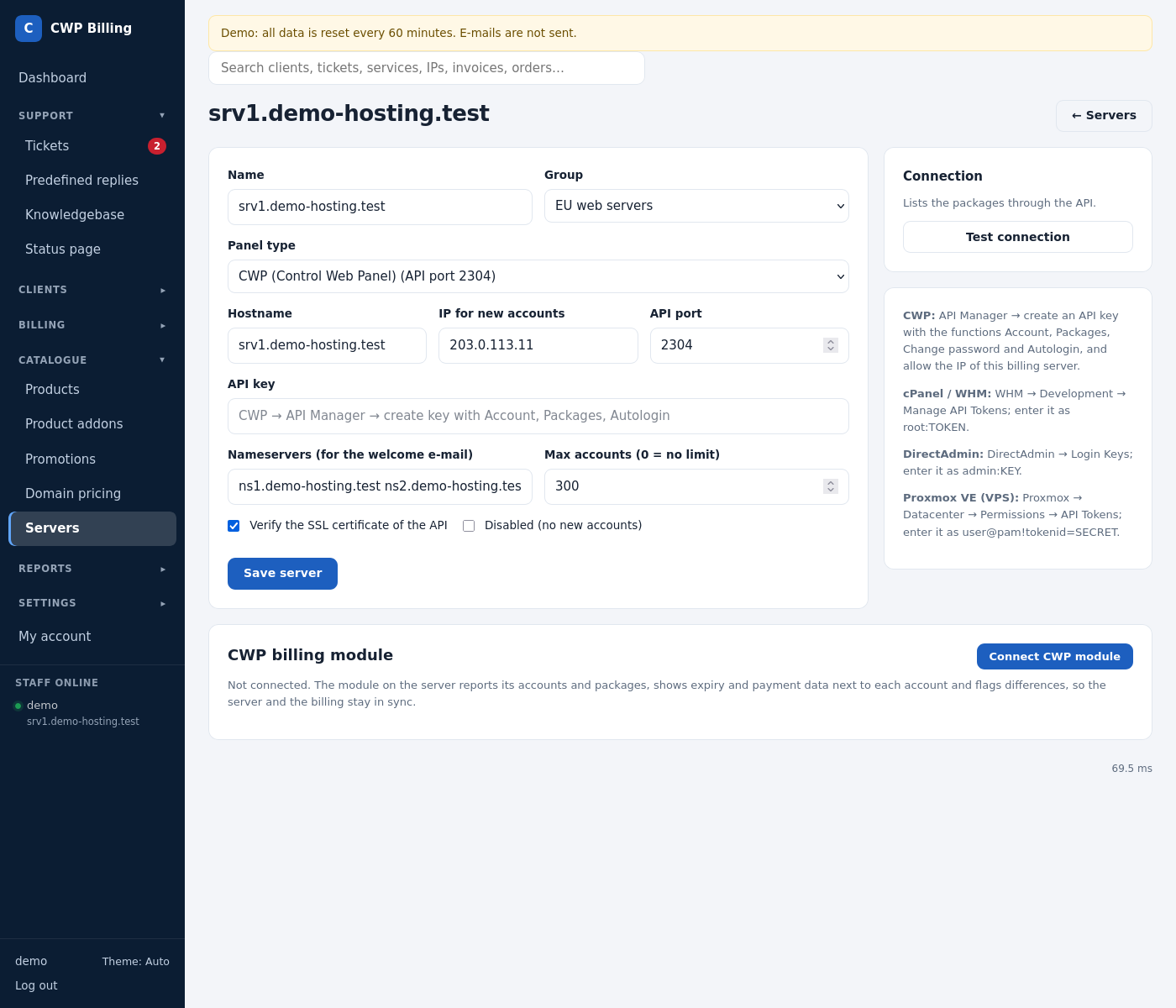
- In the billing, open Servers → the server → CWP billing module → Connect CWP module. The billing shows a one-time pairing token, valid for 24 hours and shown only once. On the command line:
php bin/console server:pair-token <server id>.
- In CWP, open Developer Menu → CWP Billing. Enter the billing address (
https://billing.example.com; it must be https) and the pairing token, then click Connect.
The module then:
- creates an API key for the billing, allowed only from the billing’s IP, and sends it to the billing together with the server’s host name, IP and CWP version;
- gets its own server token. The billing accepts the module’s calls only with this token and only from the server’s IP. The token is renewed automatically once a month.
What it does
- Account events: when an account is created, removed, suspended or unsuspended in CWP, for example by an admin, the billing is told at once. Failed messages are retried every hour for up to 7 days. Package changes are found by the hourly check.
- Hourly report: the module sends all accounts (with disk, bandwidth and inode usage), all packages and the server state (CWP version, load, free disk). In the billing, the server page shows the last report, the Differences and the Changes made on the server.
The module page in CWP
Where to find it: Developer Menu → CWP Billing. Sync now in the header sends a report at once and reads the billing again. The page has four tabs: Accounts, Packages, Connection and Log.
Accounts
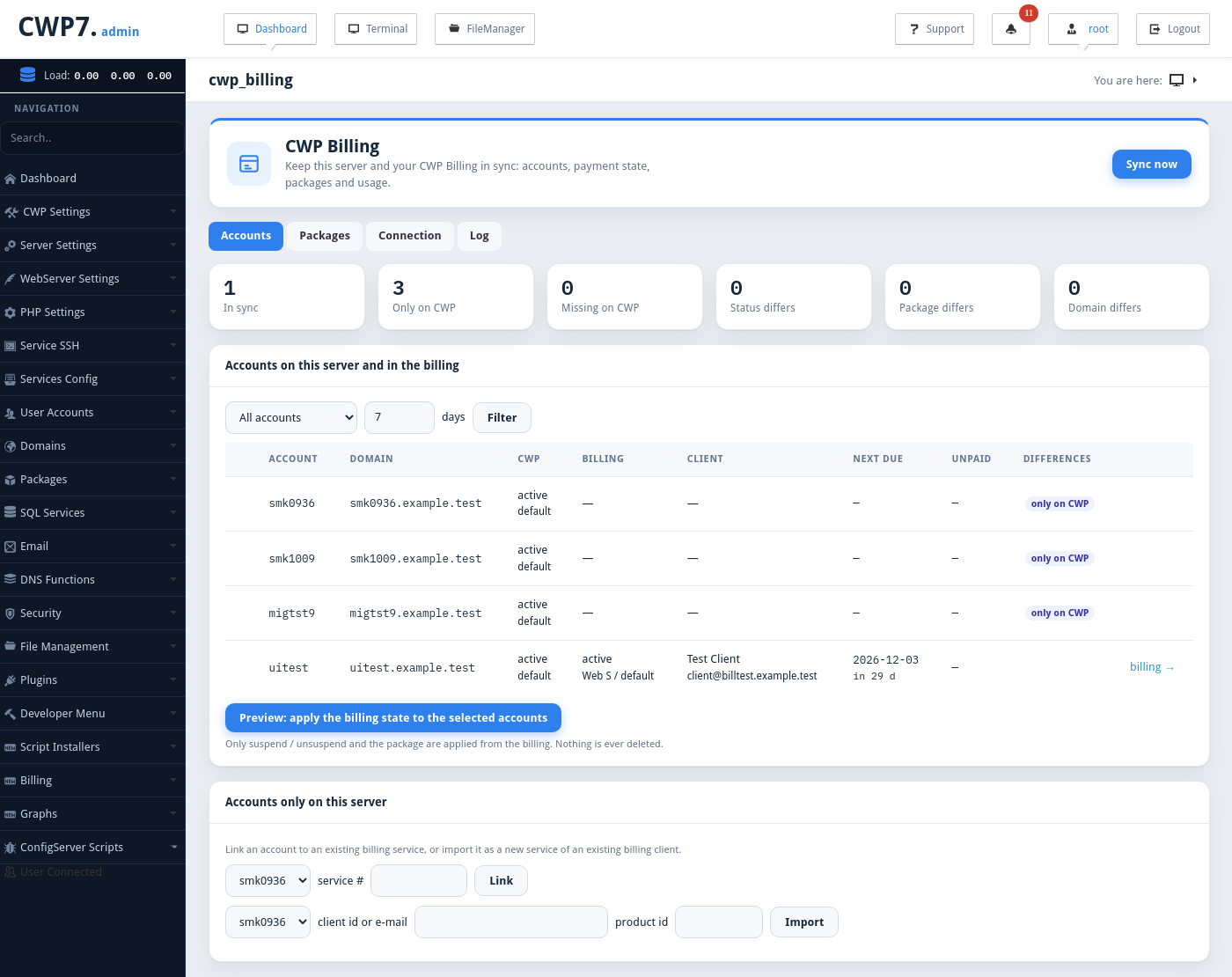
The counters at the top show how many accounts are In sync, Only on CWP, Missing on CWP, and how many have a status, package or domain that differs. The table lists every account with its CWP status and package, the billing service, the client, the next due date and the unpaid amount. Filter it by All accounts, Only differences, Due within N days or Overdue.
| Difference | Meaning |
|---|---|
| only on CWP | An account the billing doesn’t know |
| missing on CWP | A billing service (active or suspended) without an account on this server |
| status differs | Suspended in the billing but active on CWP, or the other way round |
| package differs | The billing product uses another package. |
| domain differs | The account’s domain is different in the billing. |
- Preview: apply the billing state to the selected accounts shows what would change. Apply these changes then does it. Only suspend / unsuspend and the package are applied from the billing. Nothing is ever deleted.
- Accounts only on this server:
- Link an account to an existing billing service (service #);
- Import it as a new service of an existing billing client (client ID or e-mail, and product ID).
Packages
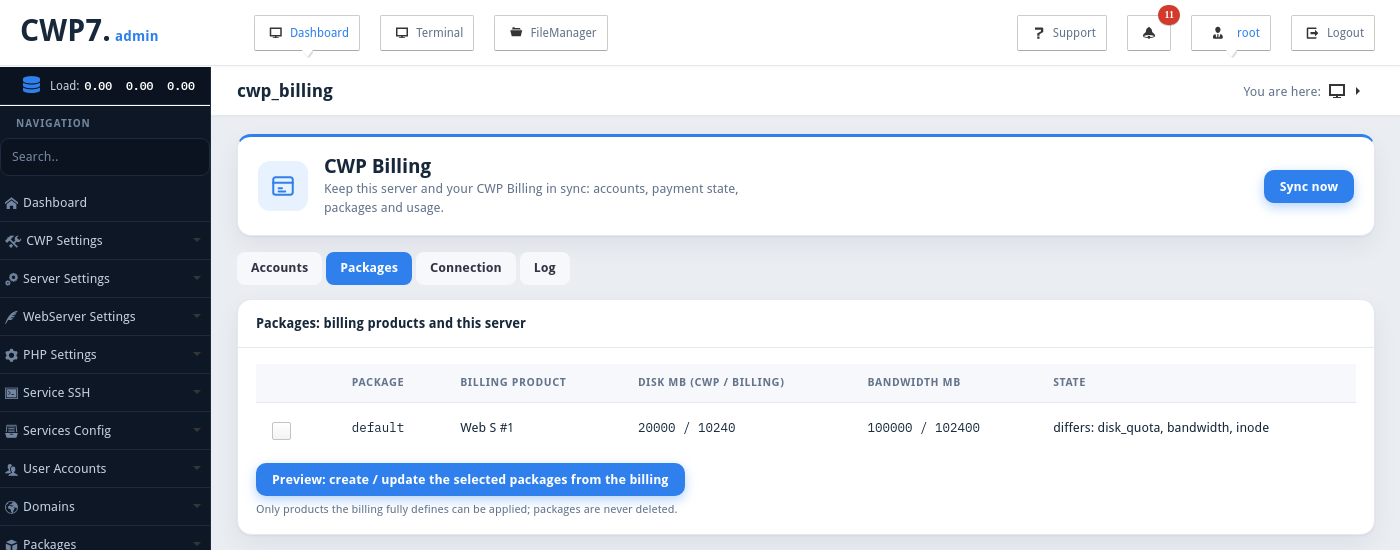
Compares each package with the billing product that uses it (disk, bandwidth and the other limits). Preview: create / update the selected packages from the billing → Apply these package changes creates or updates them. Only products the billing fully defines can be applied (products with the Package: fields filled in). Packages are never deleted.
Connection
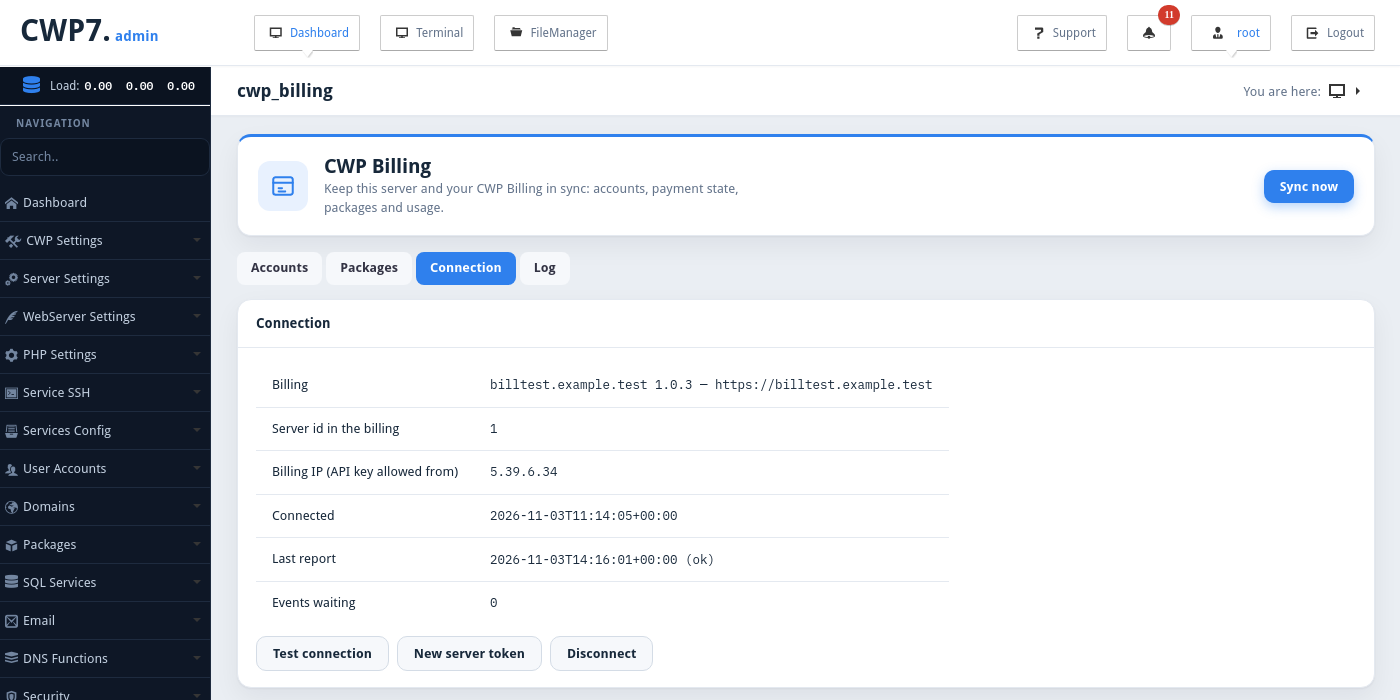
| Shown / button | Meaning |
|---|---|
| Billing | The billing’s name, version and address |
| Server id in the billing, Billing IP (API key allowed from) | |
| Connected, Last report | Times in UTC, with the result of the last report |
| Events waiting | Account events not yet delivered. They are retried every hour. |
| Test connection | Checks that the billing answers. |
| New server token | Renews the token. The old one works for one more hour. The module also does this by itself once a month. |
| Disconnect | Removes the API key of the billing and the module’s token on both sides. |
Log
Everything the module did: pairing, reports, events and applied changes.
Uninstall
/scripts/cwp_billing uninstallThis disconnects the server from the billing (it removes the API keys on both sides) and removes the menu entry, the hooks and the cron. The log is kept. Run /scripts/cwp_billing status to see the connection state.
Common problems
| Problem | Cause and solution |
|---|---|
| The billing address must be an https:// URL | The billing must have a valid SSL certificate. For a test installation with a self-signed certificate, tick Do not check the billing’s TLS certificate. |
| Pairing failed / invalid pairing token | The token is valid for 24 hours and works only once. Create a new one in the billing. |
| this IP (…) is not the IP of server … in the billing | The module calls the billing from another IP than the one in the server’s settings. Correct the server’s IP or host name in the billing. |
| The billing host name does not resolve | The CWP server cannot resolve the billing’s domain. Check /etc/resolv.conf on the server. |
| Test connection in the billing fails after pairing | The billing reaches CWP on port 2304. Open it in the CWP firewall for the billing’s IP. |
| An account shows as only on CWP | It was created outside the billing. Link it to the right service, or Import it. |
| Package does not exist on this server | The product’s CWP package is missing on this server. Create it in CWP, or fill in the Package: fields of the product and apply the package from the module. |
| Username already exists when creating | CWP user names are unique per server. Change the user name on the service and run Create account again. |