Servers are the machines where the billing creates your clients’ accounts. A server module talks to the server’s API: it creates, suspends, unsuspends and terminates accounts, changes packages and passwords, and logs the client in to the panel.
Where to find it: Servers in the left menu.
Supported panels
| Module | API used | Actions |
|---|---|---|
| CWP (Control Web Panel) | CWP API, port 2304 | Create, suspend, unsuspend, terminate, change package, change password, log in to CWP, packages kept on the server, the CWP Billing module |
| cPanel / WHM | WHM API token | Create, suspend, unsuspend, terminate, change package, change password, single sign-on |
| DirectAdmin | Login key | Create, suspend, unsuspend, terminate, change package, change password (no single sign-on) |
| Proxmox VE | API token | Create, suspend, unsuspend, terminate, change plan and password of a VM or container |
Add a server
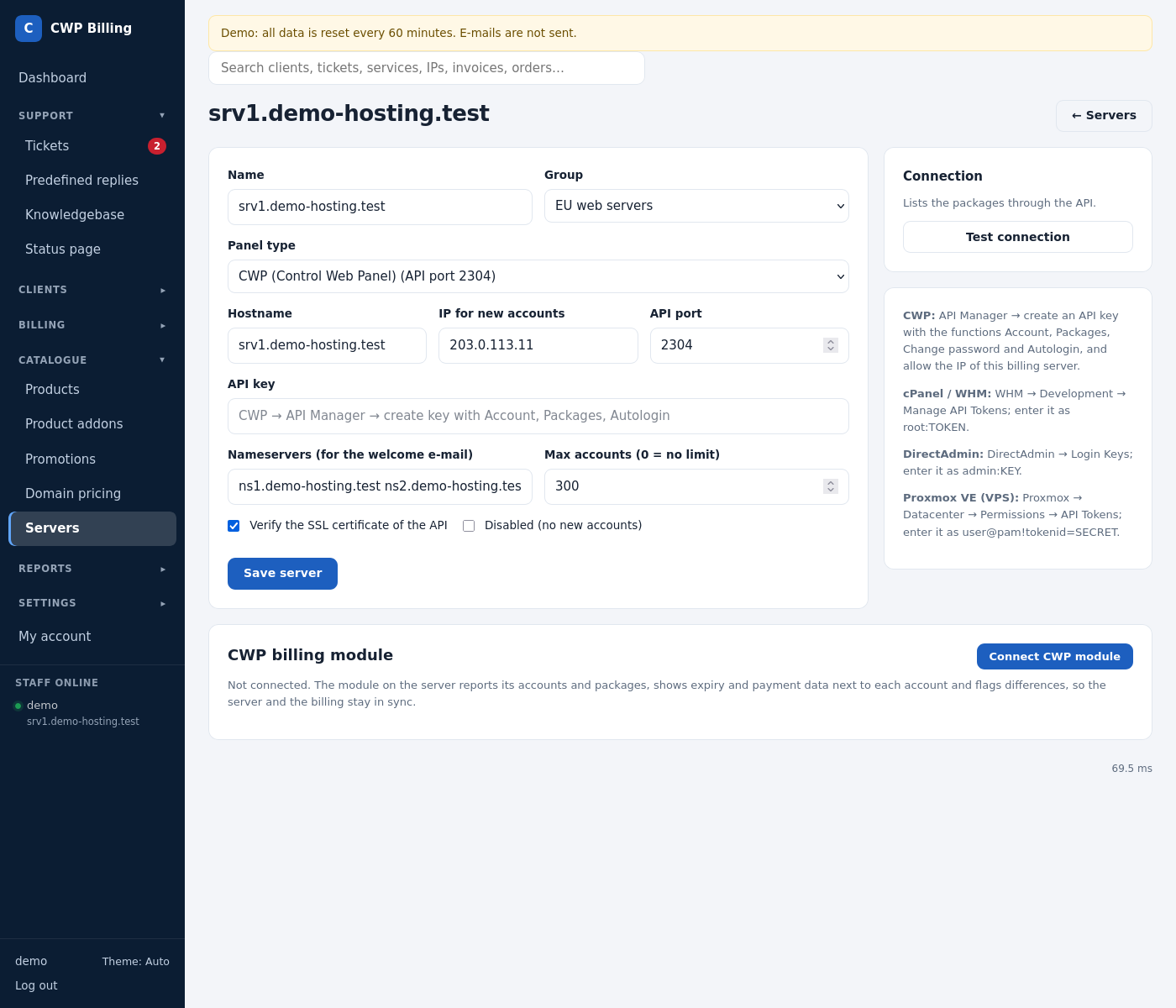
- Open Servers → Add server.
- Fill in the form:
| Field | Meaning |
|---|---|
| Name | Your name for the server, for example srv1. |
| Group | Server group. Products are linked to a group, and new accounts go to the server in the group with the fewest accounts. |
| Panel type | CWP, cPanel, DirectAdmin or Proxmox. |
| Hostname | The server’s host name. The billing calls the API at this name. |
| IP for new accounts | The shared IP that new accounts get. |
| API port | CWP: 2304. |
| API key | CWP: the key from CWP Settings → API Manager. cPanel: a WHM API token. The key is stored encrypted. |
| Nameservers | Shown in the welcome e-mail. |
| Max accounts | 0 = no limit. A full server is skipped when the billing chooses one for new accounts. |
- Click Save server, then Test connection.
From the command line:
php bin/console server:add --name=srv1 --hostname=srv1.example.com --ip=203.0.113.10 --group=Hosting --port=2304
php bin/console server:list
Module actions on a service
Open a service. The Server box on the right has these buttons:
- Create account
- Suspend
- Unsuspend
- Apply product package
- New random password
- Terminate, which deletes the account and all its data on the server
Every call and its answer are logged under Server actions on the service and Recent API calls on the server. Staff need the permission Run server actions.
Clients have Log in to the control panel on their service page (CWP and cPanel), so they don’t need a separate panel password.
Common problems
| Problem | Cause and solution |
|---|---|
| Test connection fails with a timeout | The billing server cannot reach the API port. Open port 2304 (CWP) in the firewall of the hosting server, only for the billing server’s IP. |
| Access denied / invalid key | CWP: the API key needs the billing server’s IP in the API Manager, and permissions for account, packages, changepack, changepass and user_session. |
| SSL error | The server’s certificate does not match its host name. Fix the certificate, or untick Verify the SSL certificate of the API for this server. |
| Username already exists | The billing generates the user name from the domain. If it exists on the server, change the user name on the service and run Create again. |