A CWP server is added with one command on the server and one paste in the panel. The command creates everything the panel needs, so no API settings have to be made by hand.
One command on the server
- In the panel, open Add server. The page shows the command with this panel’s IP filled in.
- On the CWP server, as root:
/scripts/datacenter_addserver <public IP of the panel>The script:
- enables the CWP API v2 if needed,
- creates an API token that only works from the panel’s IP,
- opens port 2304 in CSF for the panel’s IP only,
- prints one line that starts with
CWPDC1.It contains the server’s name, API address, token and the fingerprint of its TLS key.
- Paste the line into Add server in the panel and choose tags (optional). The panel connects, checks the token and the CWPpro license, pins the TLS key and adds the server.
- On the panel’s server, run
/scripts/datacenter_allow <server IP>if you have not yet; see Installation.
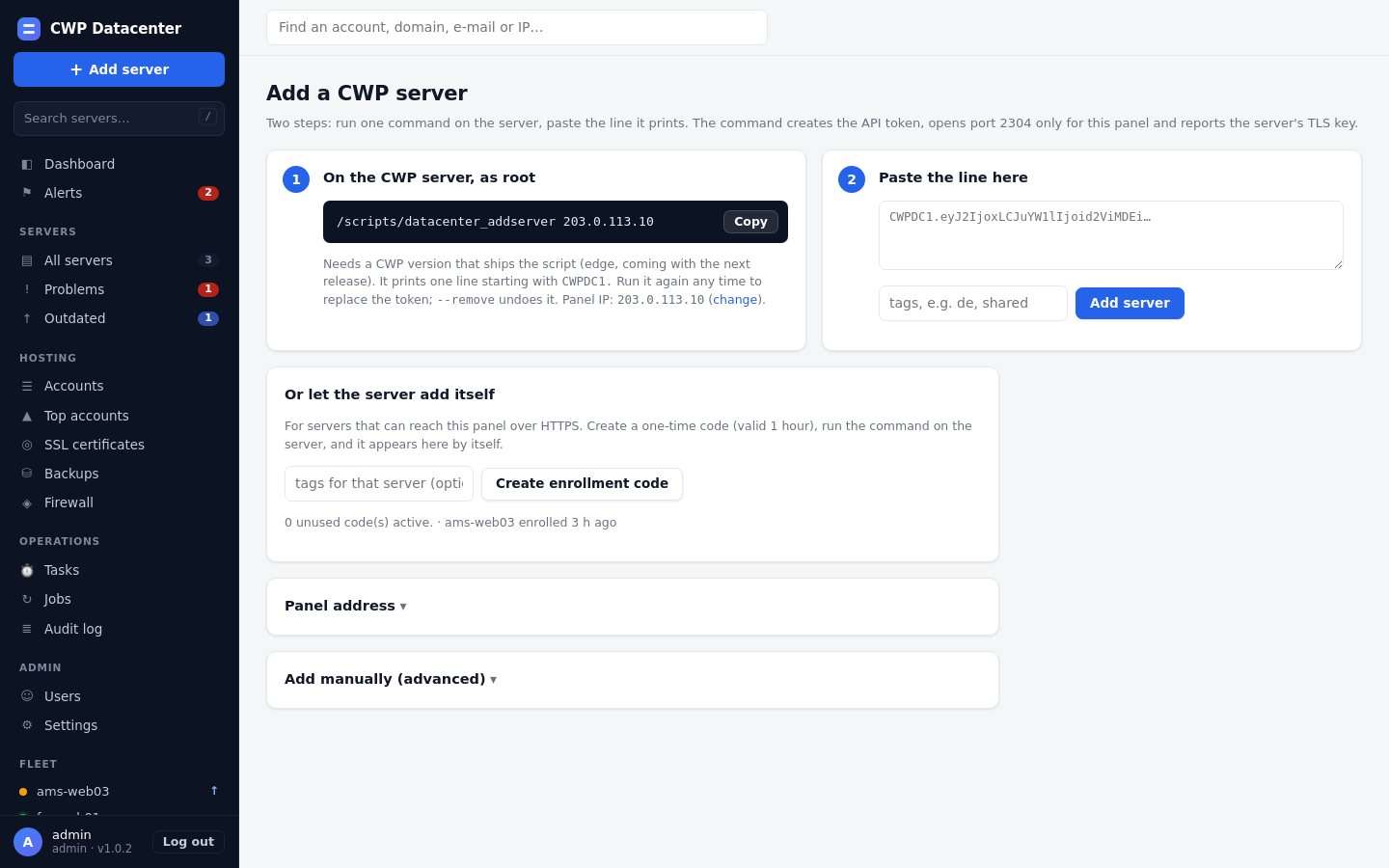
Let the server add itself
For many servers, or when you do not want to copy lines: in Add server → Or let the server add itself, create a one-time enrollment code. The panel shows a command that includes the code; run it on the CWP server and the server appears in the panel by itself. A code works once and expires after one hour.
Add manually (advanced)
Add manually takes the API v2 URL (https://server.example.com:2304/v2) and a token you created yourself in CWP (Admin → API v2, or /scripts/cwp_api2 token create).
TLS options:
- Pin the key (recommended): the panel stores the key the server presents and refuses any other key later. CWP’s self-signed certificate is fine.
- CA: a certificate from a public CA, checked normally.
- None: no check. Only for tests.
The scopes of the token decide what the panel can do. A token without services:write, for example, can show services but not restart them; the panel says so instead of failing silently.
Server settings
Each server has settings (the server page → Settings):
| Setting | Meaning | |
|---|---|---|
| Name, URL, token | Change the API address, or replace the token (the old one keeps working until you revoke it in CWP) | |
| Tags | Groups such as de, shared, ssd. Used for filters, tasks and to limit what a user can see | |
| Max accounts | The placement suggestion skips the server when it holds this many accounts | |
| CWPpro license IP | Only for a server behind 1:1 NAT whose license is bound to another IP; see {{link:datacenter-licensing | Licensing}} |
| Notes | Free text |
The server’s CWPpro license state and the time of the last check are shown below the form.
Removing a server
Settings → Delete removes the server and its history from the panel. Revoke the token on the CWP server too: /scripts/cwp_api2 token list and /scripts/cwp_api2 token revoke <id>.